Blue Green Upgrade GCP: Zero Downtime Deployments


In the relentless pursuit of continuous innovation and uninterrupted service, modern enterprises face an enduring challenge: how to deploy new software versions and critical updates without a single moment of downtime. The digital landscape demands applications that are not just functional but resilient, highly available, and capable of evolving at the speed of business. Downtime, even for a few minutes, can translate into significant financial losses, reputational damage, and a degradation of user trust. This imperative for seamless service delivery has elevated advanced deployment strategies from mere operational luxuries to fundamental business necessities. Among these strategies, Blue/Green deployment stands out as a robust and highly effective method for achieving true zero-downtime upgrades, particularly when orchestrated within the expansive and powerful ecosystem of Google Cloud Platform (GCP).
This comprehensive guide will delve into the intricacies of implementing Blue/Green deployments on GCP, providing a detailed roadmap from architectural considerations to practical execution. We will explore how GCP's rich suite of services—from its intelligent load balancers and versatile compute options to its robust networking and powerful monitoring tools—can be leveraged to construct an agile, fault-tolerant deployment pipeline. Our journey will cover the fundamental principles of Blue/Green, its architectural patterns on GCP, the critical role of APIs and API Gateways in modern deployments, and best practices for ensuring successful, risk-averse transitions. By the end, readers will possess a deep understanding of how to orchestrate true zero-downtime upgrades on GCP, ensuring that their applications remain continuously available, responsive, and ready to meet the ever-changing demands of the digital world.
The Indispensable Imperative of Zero Downtime
Before diving into the mechanics of Blue/Green deployments, it's crucial to fully appreciate why zero downtime has become an indispensable requirement for contemporary applications. In an increasingly interconnected and always-on world, user expectations have soared. Consumers and business users alike anticipate instant access to services, and even brief outages can severely impact their experience and productivity.
The True Cost of Downtime
The financial implications of downtime are often staggering, extending far beyond immediate revenue loss. For an e-commerce platform, every minute of outage during peak hours can translate into thousands, even millions, of dollars in lost sales. Beyond direct revenue, there are numerous other costs:
- Lost Productivity: Employees relying on internal applications or APIs cannot perform their tasks, leading to delays across the organization.
- Customer Churn and Dissatisfaction: Users encountering an unavailable service are likely to switch to a competitor, eroding customer loyalty and market share. Negative experiences can spread rapidly through social media, damaging brand reputation.
- SLA Violations and Penalties: Many businesses operate under Service Level Agreements (SLAs) with their clients, guaranteeing certain uptime percentages. Breaching these agreements can result in substantial financial penalties and legal repercussions.
- Data Corruption and Recovery Costs: In some cases, unexpected outages can lead to data inconsistencies or corruption, requiring costly and time-consuming recovery efforts. The impact of such events can cascade, affecting downstream systems and partner integrations that rely on accurate data.
- Operational Overheads: Engineering and operations teams must drop their planned work to respond to outages, often working long hours under immense pressure, leading to burnout and decreased morale. The post-incident analysis and preventative measures also consume significant resources.
The Strategic Value of Continuous Availability
Beyond mitigating the costs of downtime, achieving zero-downtime deployments offers significant strategic advantages:
- Accelerated Innovation: By eliminating the fear of disruptive deployments, organizations can release new features and improvements more frequently, fostering a culture of rapid innovation and competitive agility. This allows businesses to respond swiftly to market changes, incorporate user feedback, and iterate on products with unprecedented speed.
- Enhanced Reliability and Confidence: Knowing that deployments are robust and non-disruptive builds confidence among developers, operations teams, and business stakeholders. This confidence translates into more ambitious projects and a willingness to push boundaries.
- Improved User Experience: Seamless updates mean users always experience the latest and greatest version of an application without interruption, leading to higher satisfaction and engagement. This uninterrupted flow of service creates a perception of stability and professionalism that reinforces user trust.
- Reduced Risk: Blue/Green deployments inherently reduce the risk associated with changes by providing an immediate and simple rollback mechanism. If an issue is detected in the new version, traffic can be instantly switched back to the old, stable version.
In this context, Blue/Green deployment emerges not just as a technical choice but as a critical business strategy, enabling organizations to navigate the complexities of modern software delivery while upholding the highest standards of availability and performance.
Understanding Blue/Green Deployments: A Core Strategy for Resilience
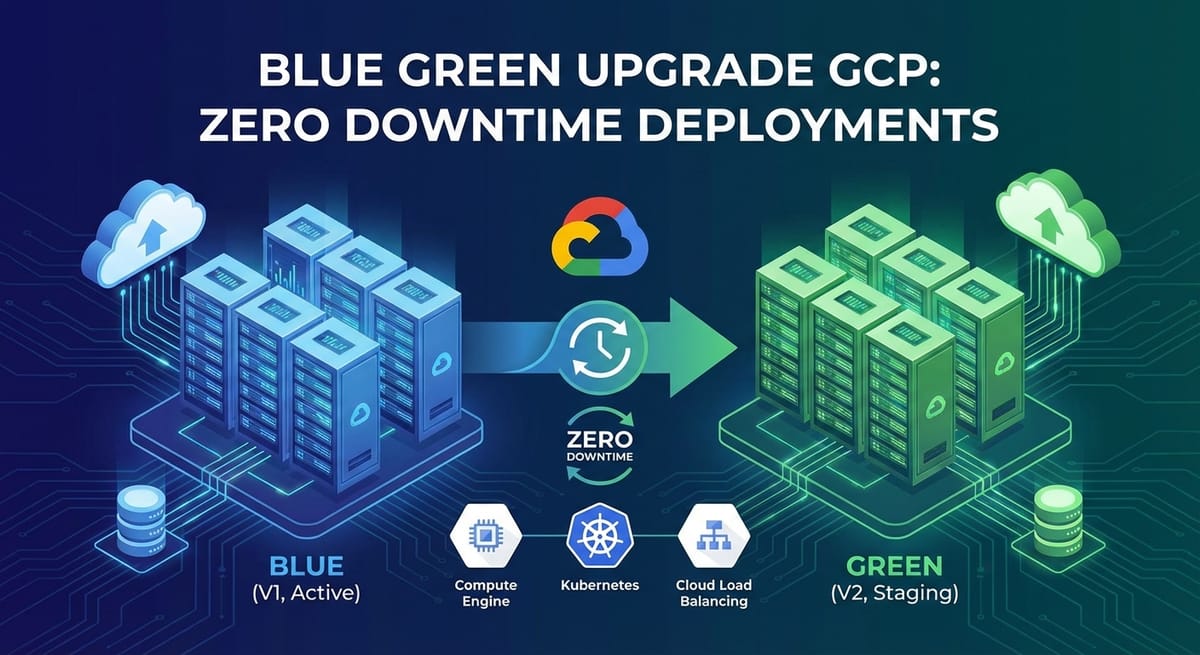
Blue/Green deployment is an application release strategy that minimizes downtime and risk by running two identical production environments, "Blue" and "Green." At any given time, only one of these environments, "Blue," is serving live production traffic. When a new version of the application is ready for deployment, it is deployed to the "Green" environment. This "Green" environment is completely isolated from the live traffic, allowing for thorough testing and validation without impacting active users. Once the new version in the "Green" environment is fully validated and deemed stable, traffic is then rapidly switched from "Blue" to "Green."
The Metaphor: Blue for Old, Green for New
The nomenclature "Blue" and "Green" is a simple yet powerful metaphor. Imagine a stage with two identical sets. "Blue" is the set currently in use, with all the actors performing. When a new act (application version) is ready, it's prepared on the "Green" set backstage. Once the "Green" set is perfect and ready, the curtain quickly shifts to reveal "Green," and the "Blue" set is taken down or kept as a backup.
In a technical context: * Blue Environment: Represents the current production environment running the stable, previously deployed version of the application. All live user traffic is directed here. * Green Environment: Represents the new, identical environment where the updated version of the application is deployed. It is prepared in parallel, often with new infrastructure provisioned specifically for this release.
Core Principles of Blue/Green
- Isolation: The Blue and Green environments are kept entirely separate. They have their own compute resources, network configurations, and often, separate database instances or schemas, depending on the application's data strategy. This isolation ensures that issues in the Green environment do not affect the live Blue environment.
- Identicality: Both environments are built to be as identical as possible in terms of hardware, software configurations, dependencies, and network topology. This minimizes the "it worked on my machine" syndrome and ensures that testing in Green is representative of the production Blue environment.
- Traffic Switching: The core mechanism of a Blue/Green deployment is the ability to rapidly switch all incoming production traffic from the Blue environment to the Green environment. This is typically managed by a load balancer, DNS records, or an api gateway, which serves as the ingress point for the application.
- Instant Rollback: One of the most compelling advantages is the straightforward rollback strategy. If any critical issues are discovered in the Green environment after traffic has been switched, the traffic can be immediately redirected back to the stable Blue environment, which is kept warmed up and ready. This capability dramatically reduces the Mean Time To Recovery (MTTR) and mitigates the risk of a faulty deployment.
- Reduced Risk: By providing a fully tested new environment and a clear fallback path, Blue/Green deployments significantly reduce the risk associated with software releases. Issues can be caught before affecting users, and recovery is swift.
Contrasting Blue/Green with Other Deployment Strategies
Understanding Blue/Green is also aided by comparing it with other common deployment methodologies:
- In-Place Upgrades: This is the simplest but riskiest method. The new version is deployed directly onto the existing servers, replacing the old version. This inevitably leads to downtime as services are stopped and restarted, and rollback can be complex and time-consuming, often requiring manual restoration from backups.
- Rolling Updates (or Rolling Deployments): In this approach, instances of the application are updated one by one, or in small batches. A new version is deployed to a subset of servers, and once validated, the next subset is updated. While this minimizes downtime compared to in-place upgrades (as some instances are always serving traffic), it doesn't eliminate it entirely, as users might experience inconsistencies if they hit an old version followed by a new version, or if the update process itself introduces errors. Rollback can also be more complicated, potentially requiring a rolling rollback across instances.
- Canary Deployments: Similar to Blue/Green in using two environments, but Canary deployments direct only a small percentage of live traffic to the new version ("Canary") initially. This allows developers to observe the new version's performance and stability with real users before gradually increasing the traffic share. While excellent for gradual risk mitigation and A/B testing, a pure Blue/Green deployment involves a complete, albeit rapid, switch of all traffic. Blue/Green focuses on testing the entire new environment in isolation before exposure to any live traffic. However, it's common to combine elements, performing canary tests on the Green environment before a full switch.
Blue/Green deployment offers the highest degree of confidence for zero-downtime releases by ensuring the new environment is fully stable before any user impact and providing an immediate, full-reversion capability. This makes it a cornerstone strategy for mission-critical applications where uninterrupted service is paramount.
Pillars of Zero Downtime on GCP
Google Cloud Platform provides a robust foundation and a comprehensive suite of services that are inherently designed to support high availability, resilience, and advanced deployment strategies like Blue/Green. Leveraging these services is key to constructing a truly zero-downtime architecture.
GCP's Foundational Services for Resilience
- Global Infrastructure: GCP's vast global network, spanning numerous regions and zones, is a significant advantage. Regions are independent geographic areas, and zones are distinct locations within a region. Deploying applications across multiple zones within a region (or even across regions for ultimate disaster recovery) ensures high availability, as an outage in one zone will not bring down the entire application. This distributed architecture is fundamental to hosting both Blue and Green environments in a fault-tolerant manner.
- Managed Services: GCP offers a wealth of managed services that simplify operations, handle scalability, and ensure high availability out-of-the-box. Services like Google Kubernetes Engine (GKE), Cloud Run, Cloud SQL, Cloud Spanner, and Cloud Load Balancing abstract away much of the underlying infrastructure complexity, allowing teams to focus on application development rather than infrastructure management. These managed services often include built-in redundancy, auto-scaling, and self-healing capabilities, which are crucial for maintaining continuous service during Blue/Green transitions.
- High-Performance Networking: GCP's private global fiber network ensures low latency and high throughput between its regions and zones. This is vital for applications that need to communicate across distributed components and for efficient traffic switching between Blue and Green environments via global load balancers. The Software-Defined Networking (SDN) capabilities of GCP's Virtual Private Cloud (VPC) allow for flexible and secure network configurations, enabling the isolation and routing required for Blue/Green.
Key Concepts for Blue/Green on GCP
Implementing Blue/Green effectively on GCP relies on several core DevOps and cloud-native principles:
- Immutable Infrastructure: This principle advocates for treating servers and other infrastructure components as immutable objects. Instead of updating existing servers in place, new servers (or instances) are provisioned with the new application version, and the old ones are decommissioned. GCP services like Managed Instance Groups (MIGs) for Compute Engine, or deployments in GKE, naturally support this paradigm. For Blue/Green, this means the Green environment is built from scratch with the new configuration, guaranteeing consistency and preventing configuration drift. If a rollback is needed, the old "Blue" immutable infrastructure is simply reinstated.
- Infrastructure as Code (IaC): To ensure that Blue and Green environments are truly identical and reproducible, their entire infrastructure should be defined in code. Tools like Terraform, Google Cloud Deployment Manager, or even Kubernetes manifests allow for declarative infrastructure provisioning. IaC enables version control, automated deployment, and consistency, reducing human error and accelerating the creation and tear-down of environments. For Blue/Green, IaC is indispensable for quickly spinning up the Green environment and ensuring it precisely mirrors the Blue environment, down to the last firewall rule and network configuration.
- Comprehensive Monitoring and Observability: You cannot achieve zero downtime without knowing what's happening within your applications and infrastructure at all times. GCP's Cloud Monitoring and Cloud Logging provide deep insights into application performance, resource utilization, and system health. For Blue/Green, robust monitoring is critical at several stages:
- Baseline Monitoring: Establishing a performance baseline for the Blue environment.
- Green Environment Validation: Closely monitoring the Green environment during pre-switch testing to ensure it's healthy and performing as expected, identifying any regressions or new issues.
- Post-Switch Validation: Immediately after the traffic switch, intense monitoring of the Green environment is necessary to catch any anomalies or performance degradation that might have been missed during testing. This early detection is crucial for a swift rollback if needed.
- Application Performance Monitoring (APM): Integrating APM solutions (like those from third-party vendors or native tracing services like Cloud Trace) helps understand application-level metrics, API response times, and error rates, which are vital for validating the quality of the new release.
- Automated Testing: Manual testing alone is insufficient for frequent, high-confidence Blue/Green deployments. A comprehensive suite of automated tests—including unit tests, integration tests, end-to-end tests, performance tests, and security scans—must be executed against the Green environment before traffic is switched. This ensures that the new version not only works as intended but also performs efficiently and securely under realistic loads. Automated testing is a non-negotiable prerequisite for minimizing risk and achieving true zero downtime.
By building on these foundational services and adhering to these key principles, organizations can construct a highly reliable and automated Blue/Green deployment pipeline on GCP, paving the way for continuous, risk-free innovation.
Diving Deep into Blue/Green Architecture on GCP
Implementing a Blue/Green deployment on Google Cloud Platform requires a strategic assembly of various GCP services, each playing a critical role in orchestrating a seamless transition. The specific architectural components will vary slightly depending on the compute platform chosen (e.g., Compute Engine, GKE, Cloud Run), but the underlying principles remain consistent.
Core Components and Their Roles
- Load Balancers (Traffic Directors):
- GCP Global External Load Balancer (Classic or Premium Tier Network Service Tiers): This is often the centerpiece of Blue/Green on GCP for internet-facing applications. It provides a single global IP address and can distribute traffic across multiple regions and, crucially for Blue/Green, across different backend services (which would represent Blue and Green environments). Traffic switching is achieved by updating the backend service configuration to point to the Green environment's instance groups or GKE services. This switch can be instantaneous and is managed at the network edge, providing extreme reliability.
- Internal Load Balancer: For internal microservices communication within a VPC, an Internal Load Balancer can direct traffic to internal Blue/Green service endpoints.
- L7 (HTTP(S)) Load Balancer: Offers advanced routing capabilities based on URL path, host, or even headers. This is particularly powerful for nuanced Blue/Green strategies, where certain paths might be routed to Green, or for combining with canary deployments to slowly shift traffic.
- Compute Instances (Application Hosts):
- Compute Engine Virtual Machines (VMs) with Managed Instance Groups (MIGs): For traditional VM-based applications, MIGs are the ideal choice.
- Blue Environment: An existing MIG running the current application version.
- Green Environment: A new MIG is provisioned with a different instance template containing the updated application version. Both MIGs are typically behind the same load balancer but with different backend services or weighted routing.
- Health Checks: Critical for both MIGs, ensuring only healthy instances receive traffic.
- Google Kubernetes Engine (GKE) Pods/Deployments: GKE is an excellent platform for Blue/Green due to its native support for declarative deployments and service abstractions.
- Deployments: Kubernetes
Deploymentobjects manage the lifecycle of application pods. For Blue/Green, you might have two separateDeploymentobjects (e.g.,app-blueandapp-green), each referencing a different Docker image version. - Services: Kubernetes
Serviceobjects provide a stable endpoint for your application pods. The key to Blue/Green on GKE is to use a singleService(e.g.,app-production) that initially points to theapp-bluedeployment. When ready to switch, theService's selector is updated to point to theapp-greendeployment. This update is fast and seamless. - Ingress: For external access, a Kubernetes
Ingressresource can expose theServicevia the Global External Load Balancer. Ingress rules can be updated to point to the GreenServicewhen ready.
- Deployments: Kubernetes
- Cloud Run/App Engine Flexible: For serverless containers or managed platform services, Blue/Green can be simpler.
- Cloud Run: Offers native traffic splitting capabilities, making Blue/Green straightforward. You deploy a new revision, and then in the Cloud Run service configuration, you can allocate 100% of traffic to the new revision, effectively switching from Blue to Green. Rollback is as simple as reallocating 100% back to the previous stable revision.
- App Engine Flexible: Similar to Cloud Run, App Engine Flexible environment services can also manage traffic splitting between different versions of an application.
- Compute Engine Virtual Machines (VMs) with Managed Instance Groups (MIGs): For traditional VM-based applications, MIGs are the ideal choice.
- Networking (Isolation and Routing):
- Virtual Private Cloud (VPC): Provides a secure and isolated network for your GCP resources. Blue and Green environments typically reside within the same VPC (or peered VPCs) but are logically isolated using subnets, firewall rules, and distinct internal IP addresses.
- Subnets: It's common to place Blue and Green resources in different subnets or use network tags to apply specific firewall rules or routing policies, further enhancing isolation.
- Firewall Rules: Carefully configured firewall rules ensure that only necessary traffic can reach the Blue and Green environments, enhancing security and preventing unintended cross-talk.
- Cloud DNS: While load balancers are primary for traffic switching, Cloud DNS can be used for very high-level switches, especially for multi-region deployments or for internal service discovery. Updating a DNS record's CNAME or A record to point to the Green load balancer can facilitate a switch, though DNS propagation times need to be considered.
- Databases (The Tricky Part):
- Cloud SQL, Cloud Spanner, Firestore: Databases are often the most challenging aspect of Blue/Green, especially when schema changes are involved.
- Forward/Backward Compatibility: The ideal scenario is that your new application version is forward and backward compatible with your database schema. This means the new version can read data from the old schema, and the old version can continue to function if the new schema is subtly different. This allows for a clean switch.
- Dual-Write: For more complex schema changes that aren't immediately backward compatible, a dual-write strategy might be employed. The old application writes to both the old and new schema. Once all data is migrated and synchronized, the new application takes over reads and writes exclusively to the new schema. This requires careful coordination and data migration scripts.
- Database Replication: For stateless applications or where data changes are minimal, you might replicate the Blue database to a new Green database instance, apply any necessary schema migrations, and then switch the Green application to use the Green database.
- Shared Database: Often, both Blue and Green applications share the same database instance. In this scenario, schema changes must be meticulously planned to be additive and non-breaking, ensuring both application versions can operate correctly with the evolving schema during the transition. Tools like Alembic or Flyway can manage migrations.
- Cloud SQL, Cloud Spanner, Firestore: Databases are often the most challenging aspect of Blue/Green, especially when schema changes are involved.
- Storage (Shared State):
- Cloud Storage: For immutable objects (images, videos, static assets), Cloud Storage buckets can be shared between Blue and Green environments. New assets deployed with the Green version are simply uploaded to the same bucket (perhaps with versioned paths) or a new bucket.
- Persistent Disks: If applications on Compute Engine VMs rely on persistent disks for state, careful consideration is needed. Generally, persistent disks are attached to specific VMs. For Blue/Green, data on these disks would either need to be replicated to a new disk for the Green environment or the application must be designed to be stateless, relying on external, shared storage like Cloud Filestore or Cloud Storage for persistent data.
- Monitoring and Logging:
- Cloud Monitoring: Collects metrics from all GCP resources (VMs, containers, load balancers, databases). Custom dashboards and alerts are essential for monitoring the health and performance of both Blue and Green environments before, during, and after the switch.
- Cloud Logging: Centralized logging for all application and infrastructure logs. Crucial for debugging issues in the Green environment and for post-switch validation. Integrated with Cloud Monitoring for log-based metrics and alerts.
- Cloud Trace / Cloud Profiler: For deeper insights into application performance, latency, and resource consumption within the Green environment.
Choosing the Right Compute Platform for Blue/Green on GCP
The choice of compute platform heavily influences the complexity and specific steps of your Blue/Green strategy.
1. Compute Engine (VMs)
- Pros: Maximum control over OS, software, and networking. Familiar for teams with traditional infrastructure backgrounds.
- Cons: More operational overhead for managing VMs, patches, and scaling. Blue/Green setup can be more manual, relying heavily on Managed Instance Groups and load balancer backend service configuration. Database handling can be complex.
- Blue/Green Method:
- Create two separate Managed Instance Groups (MIGs), one for Blue and one for Green.
- Each MIG is associated with a specific instance template for its application version.
- Configure a Global External HTTP(S) Load Balancer with two backend services, each pointing to a Blue/Green MIG.
- Initially, the load balancer directs all traffic to the Blue backend service.
- To switch, update the load balancer's URL map or path matcher to direct 100% of traffic to the Green backend service.
- Rollback involves reverting the load balancer configuration.
2. Google Kubernetes Engine (GKE)
- Pros: Cloud-native, declarative deployments. Kubernetes has built-in primitives for managing deployments and services, making Blue/Green deployments very elegant and automated. Excellent for microservices.
- Cons: Steeper learning curve for Kubernetes concepts.
- Blue/Green Method:
- Deploy the current application version as
app-blue(Kubernetes Deployment). - Create a Kubernetes
Service(e.g.,app-prod-service) that points to pods labeledapp: blue. - Expose
app-prod-servicevia a GCP Ingress (which uses the Global External Load Balancer). - Deploy the new application version as
app-green(another Kubernetes Deployment). - Thoroughly test
app-green(e.g., by directly accessing its pods or via a temporaryapp-green-service). - To switch, update the
app-prod-service's selector to point to pods labeledapp: green. Kubernetes instantly updates the service endpoint without interruption. - Rollback involves reverting the
app-prod-service's selector back toapp: blue.
- Deploy the current application version as
3. Cloud Run / App Engine Flexible
- Pros: Serverless, highly scalable, minimal operational overhead. Blue/Green is often a built-in feature or very easy to configure.
- Cons: Less control over the underlying infrastructure. May not be suitable for all types of applications (e.g., those requiring custom kernel modules or long-running background processes outside request scope for Cloud Run).
- Blue/Green Method:
- Cloud Run: Deploy the new application version as a new revision of the existing Cloud Run service. The Cloud Run console or
gcloudCLI allows you to allocate traffic between revisions (e.g., set 100% traffic to the new Green revision). This is essentially a native Blue/Green mechanism. - App Engine Flexible: Deploy the new application version as a new version of your App Engine service. Similar to Cloud Run, the App Engine console or
gcloudCLI allows for traffic splitting and switching between different versions.
- Cloud Run: Deploy the new application version as a new revision of the existing Cloud Run service. The Cloud Run console or
Each platform offers distinct advantages for Blue/Green deployments. GKE typically provides the most robust and automated solution for complex microservices architectures, while Cloud Run and App Engine Flexible offer simplicity and native support for serverless applications. The choice depends on the application's specific requirements, team expertise, and desired level of control.
| Feature / Platform | Compute Engine (MIGs) | Google Kubernetes Engine (GKE) | Cloud Run / App Engine Flexible |
|---|---|---|---|
| Control Level | High | Medium-High | Low |
| Operational Overhead | High | Medium | Low |
| Traffic Switching Mechanism | Load Balancer Backend Service update | Kubernetes Service selector update | Native Traffic Allocation/Splitting |
| Database Integration | Manual, highly dependent on app logic | Via external services or custom operators | Via external services |
| Scalability | Auto-scaling MIGs | Horizontal Pod Autoscaler | Automatic (serverless) |
| Rollback Simplicity | Medium | High (revert service selector) | High (reallocate traffic) |
| Ideal Use Case | Legacy monolithic apps, specific OS/kernel needs | Microservices, complex stateful apps | Stateless microservices, web apps, APIs |
| IaC Support | Terraform, Deployment Manager | Kubernetes Manifests, Helm, Kustomize | Terraform, gcloud scripts |
Step-by-Step Implementation of Blue/Green on GCP
Implementing a Blue/Green deployment on GCP is a multi-phase process that requires careful planning, robust automation, and vigilant monitoring. This detailed walkthrough outlines the key steps involved, ensuring a structured approach to achieving zero-downtime upgrades.
Phase 1: Preparation (Blue Environment is Live)
Before initiating any deployment, meticulous preparation sets the stage for success. This phase focuses on establishing a solid foundation for both the current "Blue" environment and the impending "Green" one.
- Define "Blue" and "Green" Environments: Clearly identify what constitutes the "Blue" (current production) and "Green" (new release candidate) environments. This includes all necessary compute resources (VMs, Kubernetes clusters/namespaces, Cloud Run services), network configurations (VPC, subnets, firewall rules), databases, and any other supporting services. Ensure that the "Green" environment is designed to be an exact replica of "Blue" in terms of infrastructure, differing only in the application code version.
- Infrastructure as Code (IaC) for Reproducibility: Every aspect of your infrastructure for both Blue and Green environments should be defined using IaC tools like Terraform, Google Cloud Deployment Manager, or Kubernetes manifests. This ensures that the Green environment can be provisioned rapidly, consistently, and without manual errors, mirroring the Blue environment precisely. Version control your IaC alongside your application code.
- CI/CD Pipeline Setup: A robust Continuous Integration/Continuous Deployment (CI/CD) pipeline is indispensable for automating the Blue/Green process. Tools like Cloud Build, GitLab CI/CD, Jenkins, or Spinnaker should be configured to:
- Build the application and container images.
- Run automated tests (unit, integration, end-to-end).
- Provision the Green environment infrastructure.
- Deploy the new application version to Green.
- Trigger automated tests against Green.
- Orchestrate the traffic switch.
- Manage rollback procedures. The goal is to eliminate manual steps as much as possible, reducing the potential for human error and increasing deployment speed.
- Monitoring and Alerting Baseline: Establish a comprehensive monitoring baseline for your existing Blue environment using Cloud Monitoring. Identify key performance indicators (KPIs) such as latency, error rates, CPU/memory utilization, and critical application-specific metrics. Configure alerts for deviations from this baseline. This baseline will be crucial for comparing the performance of the Green environment and quickly identifying any regressions post-switch.
- Database Strategy: This is a critical upfront decision. Determine how database changes will be handled. Will it be a shared database with backward-compatible schema changes? Will data be replicated to a new Green database instance? Plan for data migration scripts and ensure they are tested thoroughly and can be applied idempotently. Consider transactional DDLs where possible.
Phase 2: Deploying the Green Environment
Once the groundwork is laid, the next step is to bring the new application version to life in a fresh, isolated environment.
- Provision Green Infrastructure: Using your IaC templates, provision a completely new "Green" set of infrastructure resources on GCP. This will typically include:
- New Managed Instance Groups (for Compute Engine VMs).
- A new GKE namespace or a separate GKE cluster for the Green deployment.
- New Cloud Run revisions or App Engine versions.
- Any associated networking components (internal load balancers, specific firewall rules for the Green environment). Crucially, this Green environment operates in parallel with the Blue environment and is completely isolated from live production traffic at this stage.
- Deploy New Application Version to Green: Push the new version of your application code to the provisioned Green environment. This involves deploying new container images to GKE pods, updating instance templates for Compute Engine MIGs, or deploying new revisions to Cloud Run. Ensure that the deployment process is automated through your CI/CD pipeline.
- Database Considerations:
- If using a shared database, apply any necessary backward-compatible schema migrations to the shared database. These changes must not break the currently running Blue application.
- If using a separate Green database, apply all schema migrations and ensure data synchronization (if replication is used) is complete and accurate.
- Validate that the Green application connects correctly to the designated database (whether shared or separate).
Phase 3: Testing the Green Environment
This is the most critical phase for ensuring the new version's stability and functionality before exposing it to live users. Thorough testing is paramount.
- Internal Testing and Smoke Tests: Conduct basic functional tests to ensure the application starts correctly, key features are operational, and integrations with other services work as expected. This can involve internal developer access or automated smoke test suites.
- Integration and End-to-End Tests: Execute a comprehensive suite of automated integration tests to verify interactions between different components of your application and external services. End-to-end tests simulate real user journeys to confirm the overall system functions correctly from a user's perspective.
- Performance and Load Testing: Subject the Green environment to realistic load simulations to evaluate its performance characteristics (response times, throughput, resource utilization) under expected production traffic levels. Compare these metrics against the baseline established for the Blue environment. Identify any performance regressions or scalability bottlenecks.
- Security Scans: Run automated security vulnerability scans against the Green environment to ensure no new vulnerabilities have been introduced.
- Synthetic Monitoring / Canary Testing (Optional, but Recommended):
- Synthetic Monitoring: Deploy synthetic transactions or user journey simulations to the Green environment to continuously check its health and performance using artificial traffic.
- Canary Testing (Lightweight): While Blue/Green is typically a full switch, a small, controlled amount of internal or "shadow" traffic can be routed to the Green environment via an api gateway or load balancer rules (if supported) to gain early insights without impacting all users. This is more of a blended approach but can provide valuable real-world data points.
Phase 4: Traffic Switching
This is the moment of truth – directing live user traffic to the newly validated Green environment. The switch should be swift and atomic to minimize any disruption.
- Pre-Switch Checklist: Before the switch, re-verify all monitoring dashboards, confirm all automated tests passed, and ensure the operations team is ready for immediate action. Communicate the imminent switch to stakeholders.
- The Switch:
- Load Balancer Update: The most common method on GCP. Update the Global External Load Balancer (or Internal Load Balancer) configuration to direct 100% of incoming traffic to the Green backend service or the Kubernetes Service pointing to the Green deployment. This change is typically near-instantaneous at the load balancer level.
- DNS Update (Less Common for Apps): If direct DNS is used (e.g., for simple applications or as a fallback), update the DNS A or CNAME record to point to the Green environment's IP address or load balancer. Be mindful of DNS propagation delays, which can introduce a period of mixed traffic.
- API Gateway Routing: For applications heavily relying on APIs, an api gateway serves as a crucial traffic control point. The gateway can be reconfigured to route all requests for a specific api or endpoint to the Green backend. This offers granular control and can be part of a larger API management strategy, especially when dealing with multiple microservices. This is where a product like ApiPark can shine, by allowing precise control over API traffic routing to different service versions during a Blue/Green transition.
Phase 5: Post-Switch Validation
The deployment isn't over once the switch is made. Intensive monitoring is required to confirm stability.
- Intense Monitoring: Immediately after the switch, closely observe all relevant metrics and logs for the Green environment using Cloud Monitoring and Cloud Logging. Look for:
- Increased error rates (e.g., HTTP 5xx errors).
- Spikes in latency or response times.
- Unusual resource utilization (CPU, memory, disk I/O).
- New or unexpected log entries (errors, warnings).
- Application-specific business metrics to ensure functionality.
- User Feedback: Keep an eye on user reports or support channels for any immediate issues.
- Compare Against Baseline: Compare the Green environment's performance against the established baseline of the Blue environment. Any significant degradation or anomalous behavior should trigger immediate investigation.
Phase 6: Retiring Blue / Rollback Strategy
This phase ensures cost efficiency and provides a safety net.
- Maintain Blue for Rollback Window: Keep the Blue environment running and ready to receive traffic for a defined period (the "rollback window"). This window allows time to detect subtle issues in Green that might not appear immediately after the switch. The length of this window depends on the application's complexity and business risk tolerance.
- Rollback Procedure: If critical issues are detected in the Green environment during the rollback window, initiate an immediate rollback. This typically involves simply reverting the load balancer configuration (or api gateway routing) to direct 100% of traffic back to the Blue environment. Since Blue is fully operational and tested, this is a very fast and low-risk operation.
- Decommission Blue: If the Green environment has been stable and performing well throughout the rollback window, the Blue environment can be safely decommissioned to save costs. This involves deleting the old MIGs, GKE deployments, or App Engine versions. For shared databases, this is a clean-up of old application code.
- Promote Green to New Blue: The Green environment is now the new stable production environment, effectively becoming the "new Blue" for the next deployment cycle.
By meticulously following these steps, organizations can confidently leverage Blue/Green deployments on GCP to achieve continuous, zero-downtime upgrades, ensuring their applications remain robust and available amidst constant change.
APIPark is a high-performance AI gateway that allows you to securely access the most comprehensive LLM APIs globally on the APIPark platform, including OpenAI, Anthropic, Mistral, Llama2, Google Gemini, and more.Try APIPark now! 👇👇👇
Integrating APIs and API Gateways in Blue/Green Deployments
In the modern landscape of distributed systems, microservices architectures, and cloud-native applications, APIs are the lifeblood of interconnected components. Almost every interaction, whether internal or external, relies on well-defined APIs. Consequently, managing API changes and ensuring their continuous availability during deployments is not merely a technical detail but a critical success factor for Blue/Green strategies. This is where api gateway solutions become indispensable, acting as central control points for traffic management and API lifecycle governance.
The Pervasive Role of APIs in Modern Architectures
Today's applications are rarely monolithic. Instead, they are composed of numerous services, often microservices, that communicate with each other through APIs. A single user interaction might trigger a cascade of API calls across various internal services, third-party integrations, and specialized components like AI models. When deploying a new version of an application using Blue/Green, these underlying APIs are directly affected:
- Internal Service APIs: Updates to internal services mean their APIs might change (new endpoints, modified request/response formats, new authentication schemes). The Green environment must correctly expose and consume these updated internal APIs.
- External Consumer APIs: If your application exposes public APIs to clients or partners, any changes must be managed carefully to avoid breaking integrations. API versioning becomes crucial.
- Third-Party API Integrations: The application might rely on external APIs (e.g., payment gateways, mapping services, AI models). The Blue/Green strategy needs to ensure that both environments can correctly interact with these external services, potentially using different credentials or endpoints if the external service has a staging/production separation.
API Versioning: A Blue/Green Prerequisite
Successful Blue/Green deployments for applications with APIs often necessitate a robust API versioning strategy. This ensures that:
- Backward Compatibility: Older clients (still interacting with the "Blue" version of the API) can continue to function while newer clients (potentially interacting with the "Green" version) utilize the new features.
- Smooth Transition: The traffic switch from Blue to Green doesn't suddenly break existing API consumers. Common API versioning strategies include:
- URL Path Versioning:
api.example.com/v1/resourcevs.api.example.com/v2/resource. - Header Versioning: Using a custom HTTP header like
Accept-Version: v2. - Query Parameter Versioning:
api.example.com/resource?version=2.
During a Blue/Green deployment, the "Green" environment would expose the new API version (e.g., v2), while the "Blue" environment continues to serve the old version (v1). Once the switch is made, the load balancer or api gateway is configured to direct traffic for v1 to the legacy Blue-compatible endpoints (if maintained) and v2 to the new Green endpoints. Over time, v1 can be deprecated.
API Gateways as a Central Control Point
An api gateway is a critical component in microservices architectures and becomes particularly powerful in facilitating Blue/Green deployments. It acts as a single entry point for all API requests, abstracting away the complexities of the backend services.
How an API Gateway Facilitates Blue/Green:
- Traffic Routing and Management: An api gateway sits in front of your Blue and Green environments, intelligently routing incoming requests. Instead of directly updating load balancer configurations for every service, the gateway can be dynamically reconfigured. For Blue/Green, the gateway can switch 100% of traffic for a given API from the Blue backend to the Green backend with a simple configuration update. This provides a more granular control than a general-purpose load balancer for API-specific traffic.
- Traffic Splitting and Canary Integration: While Blue/Green is typically an all-at-once switch, an api gateway can enable more advanced strategies. Before a full Blue/Green switch, it can direct a small percentage of live traffic to the Green environment (a canary release), allowing for real-world testing of the new API version without full exposure. This is a common and highly effective way to de-risk the Blue/Green transition.
- API Version Management: The api gateway can enforce API versioning rules. For example, it can inspect the
Accept-Versionheader and route requests to the appropriate Blue or Green backend service, even if they share the same base URL. This allows for seamless transitions and support for multiple API versions simultaneously. - Unified Authentication and Authorization: The gateway can centralize authentication and authorization for all APIs, applying policies uniformly across both Blue and Green environments. This simplifies security management during deployments.
- Rate Limiting and Throttling: Prevent API abuse and ensure fair usage by applying rate limits at the gateway level, which can be maintained consistently across Blue and Green.
- Monitoring, Logging, and Analytics: A robust api gateway provides comprehensive logging and analytics for all API traffic, offering invaluable insights into the performance and behavior of the Green environment during and after the switch. This includes API call volume, latency, error rates, and user agent information. This detailed visibility is crucial for post-deployment validation.
- Protocol Translation and Transformation: Some gateway solutions can transform request/response payloads or translate between different protocols, enabling backward compatibility or facilitating integration with diverse backend services in the Green environment.
API Gateway Deployment in Blue/Green
It's also important to consider that the api gateway itself might need a Blue/Green deployment strategy, especially if it's a self-hosted solution. If the gateway is managed by a cloud provider (e.g., GCP's API Gateway or Apigee), its configuration updates for routing might be part of the Blue/Green switch, but the gateway infrastructure itself is managed by GCP. For open-source or self-managed api gateway solutions, deploying the gateway in a Blue/Green fashion (i.e., having a Green gateway instance) ensures its own updates are zero-downtime.
APIPark: Enhancing API Management in Blue/Green Deployments
For organizations heavily relying on APIs, especially those leveraging AI models, an advanced api gateway like ApiPark can be invaluable. APIPark, an open-source AI gateway and API management platform, excels at unifying API formats, encapsulating prompts into REST APIs, and providing end-to-end API lifecycle management. Its robust capabilities, including performance rivaling Nginx and detailed logging, ensure that even the most complex AI and REST services can be managed and deployed with confidence, making it a powerful ally in sophisticated deployment strategies like Blue/Green, particularly when dealing with numerous internal or external APIs that need seamless transitions.
Consider a scenario where an application needs to update its AI inference service which is exposed as an internal API. Using APIPark, the updated AI model is deployed to the Green environment. APIPark, acting as the central gateway, can then be configured to route requests for the /ai-inference API to the Green backend once validated. This switch is seamless, and because APIPark standardizes the API invocation format, the consuming application doesn't necessarily need to change, even if the underlying AI model in Green is completely different. Furthermore, APIPark's detailed logging and data analysis features provide critical observability during the post-switch validation phase, allowing teams to quickly confirm the new AI service's performance and stability. Its ability to quickly integrate 100+ AI models and manage their entire lifecycle makes it particularly relevant for future-proofing Blue/Green strategies in an AI-driven world.
In summary, for any application with a significant API footprint, the intelligent application of an api gateway is not just an enhancement but a critical enabler for successful and truly zero-downtime Blue/Green deployments on GCP. It provides the necessary layer of abstraction, control, and visibility to manage the complexities of API changes across environments.
Advanced Blue/Green Considerations
While the core principles of Blue/Green deployments remain consistent, certain application characteristics introduce complexities that require more sophisticated planning. Databases, stateful applications, and distinctions from other deployment types warrant deeper consideration.
Database Migrations: The Hardest Part
As briefly touched upon, managing database changes during a Blue/Green deployment is frequently the most challenging aspect. The database is inherently stateful, and direct replication or in-place upgrades can be risky.
- Forward and Backward Compatible Schema Changes:
- Additive Changes: The safest approach is to make schema changes that are purely additive (e.g., adding a new column, adding a new table, adding an index). These changes do not break the existing "Blue" application.
- Non-Breaking Changes: If a column needs to be renamed or its type changed, a multi-step process is usually required:
- Add a new column with the desired name/type.
- Migrate data from the old column to the new column.
- Update the "Green" application to use the new column and optionally dual-write to both.
- Once "Green" is stable and "Blue" is decommissioned, the old column can be dropped.
- Constraint Changes: Be cautious with adding or modifying constraints (e.g.,
NOT NULL,UNIQUE) which can break the old application if it inserts data that violates the new rules. Plan these carefully, potentially applying them after the full switch to Green. - Idempotency: All database migration scripts must be idempotent, meaning they can be run multiple times without causing errors or incorrect data. This is crucial for automation and rollback scenarios.
- Managed Database Services (Cloud SQL, Cloud Spanner): While these services handle backups and replication, schema changes still require careful planning. Cloud SQL offers managed database instances, but schema changes are still applied by the user. Cloud Spanner, with its schema evolution capabilities, makes some changes easier, but careful testing is always required. Firestore's schemaless nature can simplify some data model changes, but careful planning for data reads and writes across versions is still critical.
- Dual-Write Strategies: For more complex schema changes or data transformations that cannot be immediately backward compatible, a dual-write pattern can be employed.
- The "Blue" application is updated (a small, low-risk deployment) to write data to both the old and new schema locations (e.g., a new column or a new table).
- A separate data migration process ensures all historical data is synchronized from old to new.
- Once synchronization is complete and verified, the "Green" application is deployed, reading from the new schema and writing exclusively to it.
- After the "Blue" environment is fully decommissioned, the dual-write logic can be removed from the application and the old schema components dropped. This strategy is complex and requires careful orchestration.
- Logical Replication/Change Data Capture (CDC): For highly sensitive databases or very large datasets, CDC tools (often integrated with data warehousing solutions like BigQuery) can capture changes from the Blue database and apply them to a Green database instance. This allows the Green environment to have a near real-time replica for testing and eventual switchover, but requires robust data integrity checks.
Stateful Applications
Applications that maintain state (e.g., user sessions, caches, long-running processes, message queues) require special attention during Blue/Green deployments.
- Session Management:
- External Session Stores: Applications should ideally store session state externally in shared, highly available services like Memorystore (Redis/Memcached) or Cloud Firestore. Both Blue and Green environments can then access this shared state seamlessly. This eliminates the problem of sessions being tied to specific instances.
- Session Affinity (Sticky Sessions): If sessions are managed internally (not recommended for Blue/Green), the load balancer can be configured for session affinity. However, this complicates the switch, as users with active sessions would need to complete their session on Blue before being directed to Green, leading to a long transition period.
- Session Invalidation/Recreation: A less graceful approach involves invalidating existing sessions upon switch, forcing users to re-authenticate or restart their session on the Green environment. This impacts user experience but ensures state consistency.
- Caches:
- Distributed Caches: Use distributed cache services like Memorystore for Redis or Memcached, accessible by both Blue and Green environments. Cache invalidation strategies are crucial when data changes.
- Pre-warming Green Cache: Before switching traffic, pre-warm the Green environment's cache with critical data to avoid performance degradation due to cold caches.
- Message Queues (Cloud Pub/Sub):
- Cloud Pub/Sub inherently supports distributed messaging. Both Blue and Green environments can publish messages to the same topics.
- For consuming messages, ensure that only the actively serving environment (Blue, then Green) consumes messages from subscriptions. If both consume, messages might be processed twice. A common pattern is to have two separate subscriptions (one for Blue, one for Green) and only enable the active environment's subscription.
- Long-Running Processes / Batch Jobs:
- Carefully coordinate the stopping of these processes on Blue and starting them on Green to avoid duplication or data inconsistencies. Use job orchestrators like Cloud Composer (Apache Airflow) or Cloud Workflows to manage this.
- Ensure idempotency for jobs that might run partially on both environments during the transition.
Canary Releases vs. Blue/Green: Differentiating the Two
While often mentioned together, Blue/Green and Canary deployments are distinct strategies with different primary goals, though they can be combined.
| Feature | Blue/Green Deployment | Canary Deployment |
|---|---|---|
| Traffic Split | 100% switch (all or nothing) | Gradual traffic shift (e.g., 5%, 10%, 50%, 100%) |
| Primary Goal | Zero downtime, instant rollback | Risk reduction through gradual exposure, A/B testing |
| Testing | Extensive testing in isolated Green environment | Real-world user testing with small traffic segment |
| Rollback | Instantaneous switch back to stable Blue | Gradual reduction of traffic to Canary |
| Environment | Two full, identical environments (Blue & Green) | Production environment with a small "Canary" segment |
| Complexity | High (full environment duplication, database challenges) | Medium (traffic routing logic, monitoring canary) |
| Use Case | Mission-critical applications, large, confident changes | Experimental features, high uncertainty changes, A/B tests |
Combination: It's common to use a "canary on Green" approach. Before the full Blue/Green switch, a small percentage of internal or synthetic traffic is sent to Green. Or, after the switch, a small percentage of actual live traffic is directed to Green for a short period before the full cutover is made via the load balancer or api gateway. This hybrid approach provides the safety net of Blue/Green (full rollback capability) with the real-world validation benefits of canary.
Cost Management
Running two full production environments simultaneously (Blue and Green) inherently doubles your infrastructure costs, at least for a period.
- Automated Teardown: Quickly decommission the old Blue environment once the Green environment is proven stable. This requires a fully automated process.
- Resource Optimization: Use auto-scaling features (MIGs, GKE HPA) to ensure that resources are not over-provisioned in either environment. Utilize pre-emptible VMs for less critical components of the Green environment if possible, reducing costs during the testing phase.
- Shared Services: Identify components that can be shared between Blue and Green without conflict (e.g., shared Cloud Storage buckets, perhaps some monitoring infrastructure) to reduce duplication.
Security Implications
Maintaining two environments means doubling the attack surface during deployment.
- Consistent Security Policies: Ensure firewall rules, IAM policies, and security group configurations are identical for both Blue and Green environments, enforced by IaC.
- Vulnerability Scanning: Both Blue and Green environments should undergo regular vulnerability scans. The Green environment should be scanned as part of its deployment pipeline.
- Secrets Management: Use GCP Secret Manager or equivalent for managing sensitive data. Ensure both environments access secrets securely and that any new secrets required by the Green environment are provisioned correctly.
- Network Isolation: Use VPC subnets and firewall rules to strictly control traffic flow between Blue, Green, and other environments. Ensure no unauthorized access can reach the Green environment before it goes live.
Addressing these advanced considerations is crucial for a robust and mature Blue/Green deployment strategy, enabling organizations to navigate complex application requirements while maintaining uninterrupted service.
Automation with CI/CD on GCP
The true power and efficiency of Blue/Green deployments are unlocked through comprehensive automation, orchestrated by a robust Continuous Integration/Continuous Deployment (CI/CD) pipeline. On Google Cloud Platform, several services integrate seamlessly to provide an end-to-end automation solution, transforming Blue/Green from a complex manual process into a reliable, repeatable, and rapid deployment mechanism.
The Role of CI/CD in Blue/Green
A well-designed CI/CD pipeline automates every stage of the software delivery lifecycle, from code commit to production deployment. For Blue/Green, this automation is critical for:
- Consistency: Ensuring that both Blue and Green environments are provisioned identically, eliminating configuration drift and human error.
- Speed: Accelerating the deployment process, allowing for frequent releases without compromising stability.
- Reliability: Performing automated tests and checks at each stage, reducing the risk of faulty deployments.
- Rollback Efficiency: Providing a swift and automated mechanism to revert to the stable Blue environment if issues arise.
- Cost Optimization: Automating the decommissioning of the old Blue environment to minimize infrastructure costs.
Key GCP Services for CI/CD Orchestration
GCP offers a suite of tools that can be combined to build powerful CI/CD pipelines, or integrate with popular third-party tools.
- Cloud Source Repositories: Provides private Git repositories to store your application code and Infrastructure as Code (IaC) templates. It integrates directly with Cloud Build, triggering pipelines on code commits.
- Cloud Build: A serverless CI/CD platform that executes your build steps in a containerized environment. Cloud Build is highly versatile and can:
- Build and Test Application Code: Compile code, run unit tests, and create container images (e.g., Docker images pushed to Artifact Registry or Container Registry).
- Provision Infrastructure (IaC): Execute Terraform or
gcloudcommands to provision the Green environment on Compute Engine, GKE, Cloud Run, etc. - Deploy to Green: Deploy the new application version to the Green environment using specific
kubectlcommands (for GKE),gcloud run deploy(for Cloud Run), or by updating Managed Instance Group templates (for Compute Engine). - Execute Automated Tests: Run integration, end-to-end, and performance tests against the newly deployed Green environment.
- Orchestrate Traffic Switching: Update load balancer configurations, Kubernetes Service selectors, or Cloud Run traffic splits via
gcloudcommands or API calls. - Manage Rollbacks: Trigger a rollback by executing specific commands to revert traffic to the Blue environment.
- Artifact Registry (or Container Registry): A universal package manager for storing and managing build artifacts and container images. Ensures secure, versioned storage of your application's deployable components.
- Cloud Deploy: A fully managed continuous delivery service on GCP designed specifically to automate releases to GKE, Cloud Run, and App Engine. Cloud Deploy standardizes the promotion of releases across multiple environments (e.g., dev, staging, production). It defines a delivery pipeline and handles the progressive rollout of your application.
- Release Management: Manages releases, versions, and promotions between different stages.
- Automated Rollout: Can automate the process of deploying to Green, running pre-deployment checks, switching traffic, and running post-deployment checks.
- Rollback Support: Provides native rollback capabilities to revert to a previous stable release.
- Blue/Green Integration: Cloud Deploy can orchestrate Blue/Green strategies directly, abstracting away some of the complexities of manual load balancer or service updates.
- Spinnaker on GKE: For advanced multi-cloud and complex deployment strategies, Spinnaker is a powerful open-source continuous delivery platform. While it can run anywhere, deploying Spinnaker on GKE provides a robust and scalable control plane. Spinnaker offers sophisticated pipelines with extensive support for various deployment strategies, including native Blue/Green, Canary, and rolling updates across multiple cloud providers. It provides a highly visual interface for managing releases and offers granular control over each stage.
- Cloud Monitoring & Cloud Logging: As discussed, these are crucial for providing feedback to the CI/CD pipeline. Automated checks can query Cloud Monitoring metrics or analyze Cloud Logging entries to determine the health of the Green environment before proceeding with the traffic switch or triggering an automatic rollback.
Building a Blue/Green Pipeline Example (GKE-focused)
Here's a conceptual flow of a Blue/Green CI/CD pipeline on GCP using Cloud Build and GKE:
- Code Commit: Developer pushes code to Cloud Source Repositories (or GitHub/GitLab).
- Cloud Build Trigger: A Cloud Build trigger detects the commit.
- Build Phase (Cloud Build):
cloud-build.yamlsteps:- Fetch dependencies.
- Run unit tests.
- Build Docker image with new application version.
- Push image to Artifact Registry.
- Run static analysis/security scans.
- Infrastructure Provisioning (Cloud Build/Terraform):
- If using distinct Green infrastructure: Cloud Build executes Terraform to provision a new GKE namespace (
app-green-namespace) or update existing deployments to create the new version.
- If using distinct Green infrastructure: Cloud Build executes Terraform to provision a new GKE namespace (
- Deployment to Green (Cloud Build):
- Cloud Build applies Kubernetes manifests (e.g.,
app-green-deployment.yaml) to deploy the new application version toapp-green-namespace(or a new deployment with new image tag in the existing namespace).
- Cloud Build applies Kubernetes manifests (e.g.,
- Automated Testing on Green (Cloud Build):
- Cloud Build runs integration, end-to-end, and performance tests against the Green deployment. These tests access the Green application directly (e.g., via internal Kubernetes Service or temporary Ingress).
- If any tests fail, the pipeline stops, and rollback (cleaning up Green) is initiated.
- Traffic Switch (Cloud Build / Cloud Deploy):
- If using Cloud Build: Execute
kubectl patch service app-prod-service -p '{"spec":{"selector":{"app":"green"}}}'to update the Kubernetes Service selector, switching traffic to the Green deployment. - If using Cloud Deploy: A defined delivery pipeline promotes the release, Cloud Deploy manages the GKE deployment and orchestrates the traffic switch based on the pipeline configuration.
- If using Cloud Build: Execute
- Post-Switch Validation (Cloud Monitoring/Logging Integration):
- The pipeline can pause for a configurable duration, or trigger Cloud Functions that monitor Cloud Monitoring metrics and Cloud Logging for the Green environment.
- If critical errors or performance regressions are detected, an automated rollback is triggered.
- Rollback (Cloud Build / Cloud Deploy):
- If using Cloud Build: Execute
kubectl patch service app-prod-service -p '{"spec":{"selector":{"app":"blue"}}}'to revert the Service selector back to Blue. - If using Cloud Deploy: The rollback feature is invoked, reverting to the previous stable release.
- If using Cloud Build: Execute
- Decommission Blue (Cloud Build/Terraform):
- After the Green environment is proven stable for a defined period, Cloud Build executes Terraform or
kubectlcommands to decommission the old Blue deployment and its associated resources, saving costs.
- After the Green environment is proven stable for a defined period, Cloud Build executes Terraform or
By embracing this level of automation, organizations can significantly enhance their agility, reduce deployment risks, and ensure that their applications on GCP are continuously available and evolving. The integration of powerful api gateway solutions like ApiPark into this CI/CD pipeline further streamlines the management and deployment of the critical APIs that underpin these modern applications.
Best Practices and Common Pitfalls
Implementing Blue/Green deployments effectively on GCP requires more than just technical knowledge; it demands a disciplined approach and an awareness of common challenges. Adhering to best practices and understanding potential pitfalls can significantly increase the success rate of your zero-downtime strategy.
Best Practices for Blue/Green on GCP
- Start Small and Iterate: Don't attempt to implement Blue/Green for your entire complex application at once. Start with a small, less critical component or microservice. Learn from the experience, refine your processes, and then gradually expand to more critical parts of your system.
- Automate Everything: Manual steps are the enemy of reliability and speed. Automate infrastructure provisioning (IaC), application deployment, testing, traffic switching, and rollback procedures using CI/CD pipelines. This minimizes human error and ensures consistency.
- Comprehensive Monitoring and Alerting: Invest heavily in observability. Cloud Monitoring, Cloud Logging, and Cloud Trace are your eyes and ears. Set up dashboards for both Blue and Green environments with critical KPIs. Configure proactive alerts for any anomalies that could indicate a problem with the new release, both during testing and immediately after the switch.
- Test Rollback Procedures Regularly: A rollback is your ultimate safety net. It's not enough to have a rollback plan; you must practice it. Regularly simulate failures and execute the rollback procedure in a staging environment to ensure it works as expected and that your team is proficient in performing it under pressure.
- Database Strategy First: Address database changes and data migration strategies as the very first step in your planning. This is often the hardest part, and a robust plan for forward/backward compatibility, dual writes, or replication is critical for success. Assume that database changes will be painful and allocate sufficient time and resources.
- Immutable Infrastructure: Embrace immutable infrastructure. Treat servers and containers as disposable entities. Build new ones with the new application version rather than updating existing ones. This guarantees consistency and simplifies rollbacks.
- Clear Communication and Collaboration: Blue/Green deployments involve development, operations, QA, and often business stakeholders. Ensure clear communication channels and collaborative processes are in place. Everyone needs to understand their role and the status of the deployment.
- Leverage GCP Managed Services: Utilize GCP's managed services (GKE, Cloud Run, Cloud SQL, Cloud Load Balancing, Memorystore) as much as possible. They provide built-in high availability, scalability, and reduce operational overhead, making Blue/Green easier to implement and maintain.
- Define a Rollback Window: Establish a clear policy for how long the "Blue" environment will be kept alive for potential rollback. This window should be long enough to catch most post-deployment issues but short enough to manage costs effectively.
- Use API Gateways for Granular Control: For applications with numerous APIs, especially microservices, integrate an api gateway solution. This provides a central point for managing API versions, routing traffic between Blue and Green, and enforcing policies. An api gateway offers much finer-grained control over API traffic during transitions, enhancing flexibility and safety. Products like ApiPark offer specific benefits for managing API-driven architectures in such scenarios.
Common Pitfalls to Avoid
- Incomplete Testing of the Green Environment: Rushing the testing phase or having inadequate test coverage is a recipe for disaster. If the Green environment isn't thoroughly validated, the "zero-downtime" promise of Blue/Green quickly evaporates. This includes functional, integration, performance, and security testing.
- Overlooking Database Changes: This is arguably the most frequent cause of Blue/Green failures. Assuming the database can handle any application change without careful planning for schema evolution, data migration, and compatibility will lead to significant downtime and data integrity issues.
- Inadequate Monitoring Post-Switch: Merely switching traffic is not enough. Failing to closely monitor the Green environment's health, performance, and error rates immediately after the switch leaves you blind to potential problems that could escalate rapidly.
- Manual Steps in the Critical Path: Any manual step during the traffic switch or rollback introduces human error and slows down the process, negating the benefits of Blue/Green. Strive for 100% automation in these critical phases.
- Not Planning for Rollback: Assuming a deployment will always be successful and not having a tested, automated rollback plan is extremely risky. The ability to revert quickly is the ultimate safety net.
- Cost Overruns Due to Dormant "Blue": Forgetting to decommission the old "Blue" environment after a successful switch will lead to unnecessary infrastructure costs, especially in cloud environments where you pay for what you provision.
- Configuration Drift Between Environments: If Blue and Green environments are manually configured, they will inevitably diverge over time, leading to "works on my machine" type issues and unpredictable behavior in Green. IaC is the solution here.
- Not Handling Stateful Components: Neglecting how sessions, caches, and long-running processes will behave during a Blue/Green switch can lead to data loss, inconsistent user experiences, or service disruptions.
- Lack of Integration with Existing Systems: A Blue/Green deployment often impacts other internal or external systems (e.g., observability platforms, security tools, payment processors). Ensure these integrations are updated and tested in the Green environment.
- Underestimating Organizational Change: Implementing Blue/Green isn't just a technical change; it requires a shift in mindset and culture. Teams need to adapt to more frequent deployments, robust automation, and a strong emphasis on testing and observability.
By diligently adhering to these best practices and proactively mitigating common pitfalls, organizations can master Blue/Green deployments on GCP, transforming their software delivery process into a reliable, high-velocity engine for innovation.
Conclusion
The pursuit of zero-downtime deployments is no longer an aspirational goal but a fundamental requirement for any organization seeking to thrive in today's dynamic digital economy. Blue/Green deployment, when meticulously planned and expertly executed on Google Cloud Platform, stands as a premier strategy for achieving this critical objective. By leveraging GCP's robust infrastructure, intelligent load balancing, versatile compute services, and powerful monitoring tools, businesses can orchestrate seamless transitions between application versions, safeguarding user experience and business continuity.
We have traversed the comprehensive journey of Blue/Green on GCP, from understanding its foundational principles and architectural components to a detailed step-by-step implementation guide. The critical role of APIs as the glue for modern applications and the indispensable function of api gateway solutions in managing API traffic during these complex transitions have been highlighted. The capabilities of platforms like ApiPark further underscore how specialized API management can enhance the safety and efficiency of Blue/Green deployments, particularly in the context of burgeoning AI-driven services.
While challenges remain, especially concerning database migrations and stateful applications, GCP provides the elasticity, scalability, and management tools necessary to address these complexities effectively. Through the rigorous application of Infrastructure as Code, comprehensive automated testing, continuous monitoring, and the strategic integration of CI/CD pipelines, Blue/Green deployments can be transformed into a routine, low-risk operation.
Embracing Blue/Green on GCP is more than just adopting a deployment technique; it represents a commitment to continuous improvement, enhanced reliability, and accelerated innovation. It empowers development teams to deliver new features faster and with greater confidence, knowing that a robust safety net is always in place. As applications continue to grow in complexity and user expectations for uninterrupted service soar, mastering Blue/Green deployments on Google Cloud Platform will remain a cornerstone for resilient, future-ready enterprises.
5 Frequently Asked Questions (FAQs)
1. What is the primary benefit of using Blue/Green deployment over rolling updates? The primary benefit of Blue/Green deployment is the ability to achieve true zero-downtime releases with an instantaneous and low-risk rollback capability. Unlike rolling updates, where new versions are gradually introduced and might expose users to mixed versions or breakages, Blue/Green deploys the new version to a completely separate, isolated environment ("Green"). Once validated, all traffic is switched atomically from the old ("Blue") to the new ("Green") environment. If any issues arise post-switch, traffic can be immediately reverted back to the stable Blue environment without further disruption.
2. How do databases typically fit into a Blue/Green deployment strategy on GCP? Databases are often the most challenging aspect. The ideal scenario involves making database schema changes that are forward and backward compatible (e.g., additive changes) so both the old (Blue) and new (Green) application versions can operate with the same shared database. For more complex changes, strategies like dual-writing (where the old application writes to both old and new schema locations) or logical replication to a new Green database instance might be used. GCP services like Cloud SQL and Cloud Spanner require careful planning for migrations, often using tools like Flyway or Alembic, to ensure data integrity and application compatibility during the transition.
3. What role does an API Gateway play in Blue/Green deployments on GCP? An api gateway acts as a central traffic director for your APIs, providing granular control and visibility during Blue/Green transitions. It can route API requests to either the Blue or Green backend services, manage API versioning (e.g., directing v1 to Blue and v2 to Green), and even facilitate partial traffic splitting for canary testing before a full Blue/Green cutover. Furthermore, a gateway offers centralized authentication, rate limiting, and detailed logging, which are crucial for validating the new API services in the Green environment and ensuring a smooth, secure switch. Products like ApiPark are designed for this kind of advanced API management and routing.
4. How can I ensure my Blue and Green environments are truly identical on GCP? Ensuring identical environments is crucial and is best achieved through Infrastructure as Code (IaC). Tools like Terraform or Google Cloud Deployment Manager allow you to define your entire infrastructure (VMs, networks, load balancers, databases, IAM policies) in declarative configuration files. These files are version-controlled alongside your application code. By applying the same IaC templates to provision both your Blue and Green environments, you guarantee consistency, eliminate configuration drift, and enable rapid, repeatable provisioning.
5. What is the key difference between Blue/Green and Canary deployments, and can they be combined? Blue/Green deployments involve deploying a new version to a separate environment (Green) and then switching all traffic instantly from the old (Blue) to the new. Its primary goal is zero downtime and instant rollback. Canary deployments, on the other hand, involve directing only a small percentage of live traffic to the new version ("Canary") to observe its performance and stability with real users, gradually increasing traffic over time. While distinct, they can be combined: you can perform a Blue/Green deployment where, after the switch, you initially only route a small percentage of live traffic to the Green environment for a short "canary" period before a full cutover, leveraging the immediate rollback capability of Blue/Green if issues arise.
🚀You can securely and efficiently call the OpenAI API on APIPark in just two steps:
Step 1: Deploy the APIPark AI gateway in 5 minutes.
APIPark is developed based on Golang, offering strong product performance and low development and maintenance costs. You can deploy APIPark with a single command line.
curl -sSO https://download.apipark.com/install/quick-start.sh; bash quick-start.sh

In my experience, you can see the successful deployment interface within 5 to 10 minutes. Then, you can log in to APIPark using your account.

Step 2: Call the OpenAI API.