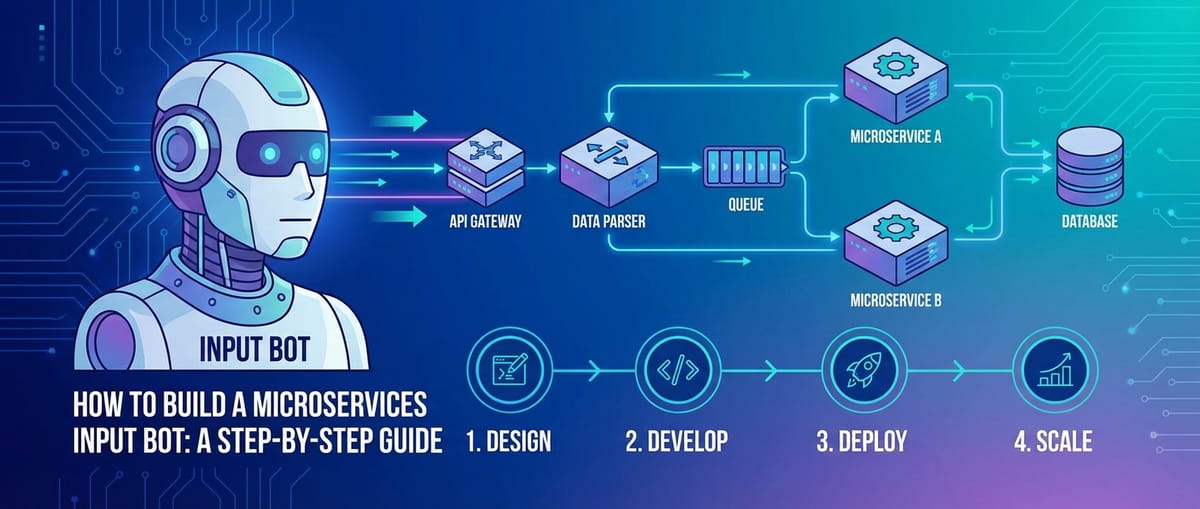
How to Build a Microservices Input Bot: A Step-by-Step Guide


In an increasingly interconnected digital landscape, the ability to efficiently ingest, process, and act upon data streams is paramount for businesses and developers alike. The advent of microservices architecture has revolutionized how we build scalable, resilient, and maintainable systems, moving away from monolithic applications towards a constellation of smaller, independently deployable services. Concurrently, the explosion of artificial intelligence, particularly Large Language Models (LLMs), has opened new frontiers for automated intelligence, understanding, and generation. This convergence creates a compelling opportunity: building sophisticated "input bots" designed to intelligently receive, interpret, and route data across diverse systems.
A microservices input bot is not merely a simple script; it is a meticulously engineered system capable of listening for incoming data from various sources (webhooks, message queues, external APIs), performing complex logic and transformations, potentially leveraging AI for deeper insights, and then directing the processed information to the appropriate downstream services or data stores. Imagine a bot that ingests customer feedback from multiple social media platforms, uses an LLM to determine sentiment and categorize topics, and then automatically creates support tickets or notifies relevant teams. Or a bot that monitors various sensor inputs, applies real-time anomaly detection, and triggers alerts through another service. The possibilities are vast, limited only by imagination and the data available.
This comprehensive guide will embark on a detailed journey to demystify the process of building such a microservices input bot. We will navigate through the foundational principles of microservices, design considerations, infrastructure setup, the development of core services, and the crucial roles played by an API Gateway and an LLM Gateway in ensuring robustness, scalability, and seamless integration with AI models. By the end of this guide, you will possess a profound understanding of the architectural patterns, technologies, and best practices required to construct a powerful, SEO-friendly input bot that stands ready to orchestrate your data flows with intelligence and precision. Each step will be elaborated with rich detail, ensuring a thorough grasp of the concepts, not just a superficial overview.
Chapter 1: Understanding the Foundation – Microservices Architecture
Before we delve into the specifics of building our input bot, it's essential to firmly grasp the architectural paradigm that underpins it: microservices. This approach has gained immense popularity over the past decade, largely due to its promise of increased agility, scalability, and resilience compared to traditional monolithic applications. Understanding why microservices are the architectural choice for our bot will lay a solid foundation for the subsequent design and implementation steps.
1.1 What are Microservices?
At its core, a microservice is a small, autonomous service that performs a single, well-defined function or a cohesive set of functions, often corresponding to a specific business capability. Instead of developing one large application that contains all functionalities (a monolith), a microservices architecture decomposes the application into a collection of loosely coupled, independently deployable services. Each service typically has its own codebase, can be developed by a small, focused team, and can be deployed and scaled independently of other services.
Consider a large e-commerce application. In a monolithic design, features like user management, product catalog, order processing, payment gateway integration, and shipping would all reside within a single application binary. In a microservices approach, these would be separate services: a User Service, a Product Service, an Order Service, a Payment Service, and a Shipping Service. Each interacts with others through well-defined APIs.
1.2 Advantages of Microservices for Bots
The choice of microservices for building an input bot is deliberate and offers several compelling advantages:
- Scalability: Different components of our bot might have varying load requirements. For instance, the input listener might experience bursts of traffic, while the LLM processing component might be computationally intensive. With microservices, we can scale these components independently. If the input queue is overflowing, we can simply add more instances of the listener service without needing to scale the entire application.
- Resilience: The failure of one microservice does not necessarily bring down the entire system. If our LLM processing service encounters an error, the input listener can continue to receive data and queue it, and other services can remain operational. This isolation enhances the overall fault tolerance of the bot.
- Independent Deployment: Each microservice can be developed, tested, and deployed independently. This means we can update or fix a specific part of our bot without having to re-deploy the entire application, significantly speeding up development cycles and reducing the risk of introducing regressions across unrelated functionalities.
- Technology Diversity: Teams can choose the best technology stack (programming language, database, libraries) for each service. While a common stack is often beneficial for consistency, the architecture doesn't enforce it. For our bot, this might mean using Python for AI-heavy services and Node.js for high-throughput I/O services.
- Team Autonomy: Small, cross-functional teams can own specific microservices end-to-end, leading to faster development, higher quality, and increased team morale.
1.3 Key Principles and Communication
Several key principles underpin a successful microservices architecture:
- Bounded Contexts: Each microservice should encapsulate a specific domain or business capability. This ensures clear responsibilities and prevents tangled dependencies. For our bot, this means distinct services for input reception, data transformation, LLM interaction, and output dispatch.
- Independent Data Stores: While not strictly mandatory, it's a strong recommendation for each microservice to own its data store. This prevents tightly coupled dependencies between services at the database level and allows each service to choose the most appropriate database technology (e.g., a NoSQL database for unstructured input data, a relational database for structured configuration).
- Communication via API: Microservices primarily communicate with each other through well-defined APIs. These APIs act as contracts, abstracting away the internal implementation details of each service. Communication can be synchronous (e.g., RESTful HTTP requests) or asynchronous (e.g., message queues or event streams). For our input bot, asynchronous communication is often preferred for resilience and handling fluctuating input rates.
1.4 The Central Role of APIs
In a microservices ecosystem, APIs are the lifeblood. They define how services interact, how data is exchanged, and how functionalities are exposed.
- Internal APIs: These are the interfaces services use to communicate with each other within the same system. They need to be robust, performant, and well-documented.
- External APIs: Our input bot will likely expose an external API to receive data from various sources (e.g., webhooks) and might also consume external APIs from third-party services.
Designing clear, consistent, and versioned APIs is critical for the long-term maintainability and evolvability of a microservices system. This foundational understanding of microservices sets the stage for designing an input bot that is not just functional, but also robust, scalable, and adaptable to future requirements.
Chapter 2: Designing Your Input Bot – Requirements and Architecture
With a clear understanding of microservices, the next critical phase is to design our input bot. This involves defining its purpose, identifying its various components, and sketching out a high-level architecture that leverages the benefits of microservices while addressing the specific challenges of data ingestion and intelligent processing. This chapter will guide you through these crucial design considerations, ensuring a robust and well-thought-out system.
2.1 Defining the Bot's Purpose and Scope
Before writing a single line of code, we must articulate what our input bot is intended to achieve. A clear definition of purpose will inform all subsequent design decisions. Let's consider a hypothetical example: an "Event Feedback Bot."
Bot Purpose: To automatically collect, analyze, and route feedback from various event platforms and internal communication channels, providing real-time insights into participant sentiment and identifying key areas for improvement.
Key Use Cases:
- Ingest Feedback: Receive feedback submissions from a survey tool (via webhook), social media mentions (via polling or streaming API), and internal chat channels (via message broker).
- Process and Analyze:
- Normalize raw text data.
- Use a Large Language Model (LLM) to perform sentiment analysis (positive, negative, neutral).
- Use an LLM to extract key topics or themes (e.g., "speaker quality," "venue," "content relevance").
- Identify actionable items (e.g., "bug report," "feature request").
- Route and Store:
- Store all raw and processed feedback in a centralized database.
- For negative sentiment or identified bugs, create a ticket in a project management system (e.g., Jira, Asana) via its API.
- For positive feedback, send a notification to a "kudos" Slack channel.
- Generate real-time dashboards for overall sentiment trends.
This detailed purpose clarifies the inputs, the processing logic, and the expected outputs, setting concrete requirements for our microservices.
2.2 Identifying Input Sources and Output Destinations
The bot's interaction points are crucial. These dictate the communication protocols and integration strategies for our microservices.
Input Sources:
- Webhooks: External services (e.g., survey platforms like SurveyMonkey, payment gateways, marketing automation tools) can send HTTP POST requests to a predefined URL whenever an event occurs. This is a common and efficient way to receive real-time data.
- Polling External APIs: Some services might not offer webhooks. In such cases, a microservice might periodically call an external API to check for new data (e.g., fetching new social media posts, checking for updated records in a CRM).
- Message Queues/Brokers: Internal systems or other microservices can publish messages to a queue (e.g., Kafka, RabbitMQ). Our input bot can subscribe to these queues to receive data asynchronously, which is excellent for handling high-volume or bursty data streams.
- Direct API Calls: Other internal services might make direct RESTful API calls to our bot's exposed endpoints, especially for specific, on-demand processing.
Output Destinations:
- Databases: For persistent storage of raw and processed data (e.g., PostgreSQL, MongoDB).
- External APIs: Calling external services (e.g., Jira API for ticket creation, Slack API for notifications, CRM API for updating customer records).
- Message Queues/Brokers: Publishing processed data or events for other internal microservices to consume.
- Real-time Dashboards/Reporting Tools: Pushing aggregated data for visualization.
2.3 Core Components of the Bot (Microservices Breakdown)
Based on our defined purpose, we can decompose the bot's functionality into distinct microservices:
- Input Receiver Service:
- Purpose: The single entry point for all incoming data. It listens for webhooks, polls external APIs, or subscribes to message queues. Its primary job is to validate the incoming data structure and then immediately pass it to a processing queue, acting as a lightweight, highly available ingestion point.
- Technologies: Likely a fast HTTP server framework (e.g., Flask/FastAPI in Python, Express in Node.js, Spring Boot in Java).
- Interaction: Exposes public API endpoints (e.g.,
/webhook/survey,/webhook/social).
- Data Normalizer Service:
- Purpose: Takes raw input data, standardizes its format, extracts relevant fields, and performs initial cleaning. This ensures downstream services receive consistent data.
- Technologies: Could be Python for its data processing libraries, or any language suitable for string manipulation and data structure transformation.
- Interaction: Consumes from a message queue (e.g.,
raw_feedback_queue), publishes to another (e.g.,normalized_feedback_queue).
- LLM Processing Service:
- Purpose: The intelligent core of our bot. It interacts with Large Language Models to perform tasks like sentiment analysis, topic extraction, summarization, or entity recognition.
- Technologies: Python is a strong candidate due to its rich ecosystem for AI/ML.
- Interaction: Consumes from
normalized_feedback_queue, interacts with an LLM Gateway (which in turn talks to various LLMs), and publishes enriched data toanalyzed_feedback_queue.
- Action Dispatcher Service:
- Purpose: Based on the analyzed feedback, this service determines and triggers appropriate actions.
- Technologies: Any general-purpose language.
- Interaction: Consumes from
analyzed_feedback_queue. Makes external API calls (e.g., Jira API, Slack API), potentially publishes to a database write queue.
- Persistence Service:
- Purpose: Handles all interactions with the database, ensuring data integrity and consistency. It might store raw input, normalized data, and analyzed insights.
- Technologies: Depending on database choice (e.g., a Python service for MongoDB, a Java service for PostgreSQL).
- Interaction: Consumes from various queues for data to be stored.
2.4 The Role of an API Gateway
With multiple microservices, managing external access becomes complex. This is where an API Gateway steps in. It acts as a single entry point for all external consumers, abstracting away the underlying microservice architecture.
- Unified Access: Instead of clients needing to know the URLs for each microservice, they interact with a single API Gateway endpoint.
- Routing: The API Gateway routes incoming requests to the appropriate backend microservice.
- Security: It centralizes authentication, authorization, and rate limiting, protecting individual microservices from direct exposure.
- Load Balancing: Distributes requests across multiple instances of a microservice.
- Monitoring: Provides a central point for logging and monitoring external traffic.
For our bot, the Input Receiver Service would likely sit behind the API Gateway, allowing the gateway to handle initial security and routing.
2.5 Considering an LLM Gateway
As our bot leverages LLMs, integrating them directly into each processing service can become cumbersome. Different LLMs have different API formats, authentication mechanisms, and rate limits. This is precisely the problem an LLM Gateway solves.
An LLM Gateway acts as an abstraction layer for interacting with multiple LLM providers (e.g., OpenAI, Google Gemini, custom models). It offers:
- Unified API: A single, consistent API for interacting with any LLM, regardless of the underlying provider's specific format.
- Prompt Management: Centralized management and versioning of prompts, allowing for A/B testing and easier prompt engineering.
- Cost Tracking and Rate Limiting: Monitors usage and applies rate limits across different LLM providers.
- Model Routing/Fallback: Intelligently routes requests to different LLMs based on cost, performance, or availability, providing fallback mechanisms.
If our bot needs to dynamically switch between different LLMs or manage a large number of prompts, an LLM Gateway becomes an indispensable component.
2.6 High-Level Architectural Diagram (Conceptual)
To solidify this design, let's visualize the interaction:
graph TD
    A[External Sources: Webhooks, Social Media, etc.] --> B(API Gateway)
    B --> C[Input Receiver Service]
    C --> D(Message Queue: Raw Feedback)
    D --> E[Data Normalizer Service]
    E --> F(Message Queue: Normalized Feedback)
    F --> G[LLM Processing Service]
    G --> H(LLM Gateway)
    H --> I[LLM Provider 1: OpenAI]
    H --> J[LLM Provider 2: Gemini]
    H --> K[Custom LLM Model]
    G --> L(Message Queue: Analyzed Feedback)
    L --> M[Action Dispatcher Service]
    M --> N[External APIs: Jira, Slack, etc.]
    L --> O[Persistence Service]
    O --> P[Database]
    subgraph Core Bot Services
        C
        E
        G
        M
        O
    end
    subgraph Gateways
        B
        H
    end
    subgraph Data Flow
        D
        F
        L
    end
This conceptual diagram illustrates the flow of data through our microservices input bot, highlighting the critical roles of the API Gateway and LLM Gateway in mediating interactions and providing crucial layers of abstraction and control.
Chapter 3: Setting Up the Infrastructure
Once the design of our microservices input bot is finalized, the next crucial step is to prepare the underlying infrastructure. Microservices thrive in environments that support isolation, scalability, and ease of deployment. This chapter will explore the essential infrastructure components, from deployment environments to data storage and communication mechanisms, ensuring a robust foundation for our bot.
3.1 Choosing a Deployment Environment: Cloud vs. On-Premise
The first decision often involves where your services will live.
- Cloud Providers (AWS, Azure, GCP):
- Advantages: Scalability on demand, managed services (databases, queues, Kubernetes), reduced operational overhead, global reach, cost-effective for variable loads.
- Disadvantages: Vendor lock-in, potential for higher costs with steady, high loads if not optimized, security concerns (though often mitigated by shared responsibility models).
- Recommendation: For most modern microservices deployments, cloud platforms offer unparalleled flexibility and a rich ecosystem of managed services that simplify infrastructure management.
- On-Premise:
- Advantages: Full control over hardware and software, potentially better for highly sensitive data or specific regulatory requirements, no recurring cloud costs (though initial investment is high).
- Disadvantages: High operational overhead (hardware procurement, maintenance, networking, security), slower scalability, significant upfront investment.
- Recommendation: Less common for new microservices projects unless specific compliance or legacy requirements dictate it.
For our input bot, especially given the potential for varying loads and the need for potentially complex managed services (like message queues or AI platforms), a cloud provider is generally the more pragmatic choice.
3.2 Containerization with Docker and Orchestration with Kubernetes
These technologies are almost synonymous with modern microservices deployments.
- Docker (Containerization):
- Concept: Docker packages an application and all its dependencies (libraries, configuration files, environment variables) into a single, isolated unit called a container. This ensures that the application runs consistently across different environments (developer's laptop, staging, production).
- Benefit for Bots: Each microservice of our bot (Input Receiver, LLM Processor, etc.) can be containerized. This provides isolation, guarantees consistent behavior, and simplifies dependency management. A Dockerfile defines how to build the container image for each service.
- Example: Our
LLM Processing Servicemight require specific Python libraries and machine learning dependencies. Docker ensures these are packaged directly with the service.
- Kubernetes (Container Orchestration):
- Concept: Kubernetes (K8s) is an open-source system for automating deployment, scaling, and management of containerized applications. It handles tasks like load balancing, self-healing (restarting failed containers), scaling up/down based on demand, and rolling updates.
- Benefit for Bots:
- Scalability: If our
Input Receiver Serviceexperiences a spike in incoming webhooks, Kubernetes can automatically spin up more instances to handle the load. - High Availability: If an instance of our
Action Dispatcher Servicecrashes, Kubernetes detects it and automatically replaces it. - Service Discovery: Services can find and communicate with each other without hardcoding IP addresses.
- Simplified Deployment: Define your desired state (e.g., "I want 3 instances of my
LLM Processing Servicerunning"), and Kubernetes works to achieve and maintain it.
- Scalability: If our
- Recommendation: While there's a learning curve, Kubernetes is the de facto standard for orchestrating microservices in production due to its powerful features and strong community support. Managed Kubernetes services (EKS, AKS, GKE) in the cloud simplify its setup and management.
3.3 Networking: Service Discovery and Load Balancing
In a dynamic microservices environment, services need to find and communicate with each other.
- Service Discovery: How does our
Data Normalizer Serviceknow where to send messages to theLLM Processing Service?- DNS-based (Kubernetes): Kubernetes provides built-in service discovery where each service gets a stable DNS name, abstracting away the underlying pod IPs.
- Registry-based (e.g., Consul, Eureka): Services register themselves with a central registry upon startup, and other services query this registry to find available instances.
- Load Balancing: When multiple instances of a service are running, requests need to be distributed among them.
- API Gateway: As discussed, the API Gateway acts as the primary load balancer for incoming external traffic to our
Input Receiver Service. - Internal Load Balancing (Kubernetes): Within Kubernetes, a
Serviceobject automatically provides load balancing to the pods it targets. - Message Queues: For asynchronous communication, message queues inherently distribute tasks among competing consumers.
- API Gateway: As discussed, the API Gateway acts as the primary load balancer for incoming external traffic to our
3.4 Database Selection: SQL vs. NoSQL
Choosing the right database for each service's independent data store is crucial.
- Relational Databases (SQL - e.g., PostgreSQL, MySQL, SQL Server):
- Strengths: Strong consistency (ACID properties), well-suited for structured data with complex relationships, robust querying with SQL.
- Use Case for Bot: Our
Persistence Servicemight use a relational database to store configuration data, audit logs, or structured summaries of analyzed feedback where referential integrity is critical.
- NoSQL Databases (e.g., MongoDB, Cassandra, Redis):
- Strengths: High scalability, flexible schemas, better for unstructured or semi-structured data, often optimized for specific access patterns (key-value, document, graph, wide-column).
- Use Case for Bot: The
Persistence Servicemight use a document database like MongoDB to store raw incoming feedback (which can be highly variable in structure) or the detailed LLM analysis results, where schema flexibility is advantageous. Redis could be used for caching frequently accessed data or for rate limiting within the API Gateway.
- Considerations: Each microservice should ideally own its database. The
Persistence Servicemight internally interact with multiple database technologies, each chosen for the specific data it manages.
3.5 Message Brokers for Asynchronous Communication
Asynchronous communication is vital for building resilient and scalable microservices, especially in an input bot that deals with potentially spiky data ingestion.
- Concept: Message brokers (or message queues) allow services to communicate without directly calling each other. A "producer" service sends a message to a queue, and a "consumer" service retrieves messages from that queue.
- Benefits for Bots:
- Decoupling:
Input Receiver Servicedoesn't need to know ifData Normalizer Serviceis up; it just publishes to the queue. - Buffering: Handles bursts of incoming data. If the
LLM Processing Serviceis temporarily slow, messages queue up without overwhelming it or causing theData Normalizer Serviceto fail. - Reliability: Messages can be persisted, ensuring they are processed even if a consumer service goes down and restarts.
- Scalability: Multiple instances of a consumer service can process messages from the same queue in parallel.
- Decoupling:
- Popular Options:
- Kafka: High-throughput, fault-tolerant, distributed streaming platform. Excellent for handling large volumes of events and real-time data pipelines. Ideal for the
raw_feedback_queueandanalyzed_feedback_queue. - RabbitMQ: A general-purpose message broker supporting various messaging patterns. Good for task queues and more traditional message passing.
- AWS SQS/SNS, Azure Service Bus, GCP Pub/Sub: Managed cloud message queuing services, reducing operational burden.
- Kafka: High-throughput, fault-tolerant, distributed streaming platform. Excellent for handling large volumes of events and real-time data pipelines. Ideal for the
By meticulously configuring these infrastructure components, we establish a robust and flexible environment that is well-suited for the dynamic demands of a microservices input bot. The choice of managed cloud services, containerization with Docker, orchestration with Kubernetes, appropriate database selection, and reliable message brokers will collectively empower our bot to scale, remain resilient, and operate efficiently.
Chapter 4: Developing Core Microservices
With a solid architectural design and the underlying infrastructure in place, we now turn our attention to the heart of our input bot: developing the individual microservices that perform its core functions. This chapter will detail the responsibilities, technologies, and implementation considerations for each key service, emphasizing their intercommunication and independent nature.
4.1 Input Receiver Microservice
This service is the front door of our bot, responsible for gracefully accepting all incoming data. It must be highly available and performant, as it’s the first point of contact for external systems.
- Purpose:
- Receive data via various channels (webhooks, polling external APIs, subscribing to initial message queues).
- Perform immediate, lightweight validation (e.g., checking for required fields, ensuring the request is well-formed).
- Authenticate and authorize incoming requests (though the API Gateway will handle much of this, the service should still verify token validity if applicable).
- Immediately publish the raw, validated input to a message queue for further asynchronous processing. This "fire-and-forget" pattern prevents the receiver from becoming a bottleneck.
- Technologies:
- Python with FastAPI/Flask: Excellent for building fast, asynchronous HTTP APIs. FastAPI, in particular, offers automatic documentation (OpenAPI/Swagger UI) and Pydantic for data validation, which are invaluable for defining webhook payloads.
- Node.js with Express: Also highly capable for high-throughput, non-blocking I/O operations, making it a good choice for handling many concurrent connections.
- Java with Spring Boot: A robust framework for enterprise-grade applications, offering comprehensive features for building RESTful services.
- Implementation Details:
- Webhook Endpoints: Define specific
/webhook/{source_name}endpoints (e.g.,/webhook/survey,/webhook/social). Each endpoint should expect a specific JSON payload structure. - Payload Validation: Use schema validation (e.g., Pydantic models in Python, Joi in Node.js) to ensure incoming data conforms to expected types and structures. Reject malformed requests early.
- Asynchronous Publishing: Upon successful validation, the service should publish the raw data to a Kafka topic or RabbitMQ queue. Ensure message acknowledgment and retry mechanisms are in place for robust message delivery.
- Error Handling: Implement robust error handling with appropriate HTTP status codes (e.g., 200 OK for successful receipt, 400 Bad Request for invalid payload, 500 Internal Server Error for unexpected issues) and detailed logging.
- Example (Python/FastAPI): ```python # Simplified example from fastapi import FastAPI, HTTPException from pydantic import BaseModel from kafka import KafkaProducer import jsonapp = FastAPI() producer = KafkaProducer( bootstrap_servers='kafka:9092', value_serializer=lambda v: json.dumps(v).encode('utf-8') )class SurveyFeedback(BaseModel): event_id: str user_id: str rating: int comment: str = None@app.post("/techblog/en/webhook/survey") async def receive_survey_feedback(feedback: SurveyFeedback): try: # Add metadata like timestamp, source IP, etc. raw_data = feedback.dict() raw_data['source'] = 'survey' producer.send('raw_feedback_topic', raw_data).get(timeout=10) return {"message": "Feedback received and queued successfully"} except Exception as e: raise HTTPException(status_code=500, detail=f"Failed to process feedback: {str(e)}") ```
- Webhook Endpoints: Define specific
4.2 Data Normalizer Service
This service takes the raw, potentially disparate data from the input queue and transforms it into a standardized, consistent format that downstream services can easily consume.
- Purpose:
- Consume raw messages from the input queue.
- Perform data cleaning (e.g., removing extra spaces, handling special characters).
- Extract relevant fields from varying source formats and map them to a unified internal schema.
- Enrich data with common attributes (e.g., adding a processing timestamp, a unique
trace_idfor end-to-end tracing). - Publish the normalized data to a new message queue.
- Technologies: Any language strong in data manipulation. Python is often preferred due to its extensive libraries (Pandas, custom data parsing).
- Implementation Details:
- Message Consumption: Set up a consumer that continuously polls the
raw_feedback_topic. - Transformation Logic: Implement specific parsing and mapping rules for each
sourcetype. For example, asocial_mediainput might require extracting hashtags, while asurveyinput needs to map rating numbers to sentiment labels. - Unified Schema: Define a clear, canonical JSON schema for all normalized data. This is crucial for consistency.
- Error Handling: If a message cannot be normalized, send it to a Dead Letter Queue (DLQ) for manual inspection, rather than blocking the main processing flow.
- Example (Python consumer): ```python # Simplified example for Data Normalizer from kafka import KafkaConsumer, KafkaProducer import jsonconsumer = KafkaConsumer( 'raw_feedback_topic', bootstrap_servers='kafka:9092', auto_offset_reset='earliest', enable_auto_commit=True, group_id='normalizer-group', value_deserializer=lambda x: json.loads(x.decode('utf-8')) ) producer = KafkaProducer( bootstrap_servers='kafka:9092', value_serializer=lambda v: json.dumps(v).encode('utf-8') )for message in consumer: raw_data = message.value try: normalized_data = { "trace_id": raw_data.get("trace_id", "gen_new_id"), # Add trace ID "timestamp": raw_data.get("timestamp", "current_time"), "source": raw_data['source'], "text_content": raw_data['comment'] if raw_data['source'] == 'survey' else raw_data['text'], # Example mapping "original_id": raw_data.get("id"), # ... more normalized fields } producer.send('normalized_feedback_topic', normalized_data).get(timeout=10) except Exception as e: print(f"Error normalizing message {raw_data}: {e}") # Send to DLQ ```
- Message Consumption: Set up a consumer that continuously polls the
4.3 LLM Processing Service
This is where the bot gains its intelligence. It interacts with Large Language Models (LLMs) to derive deeper insights from the normalized text.
- Purpose:
- Consume normalized data from its queue.
- Construct prompts for LLMs based on the
text_contentand desired analysis (e.g., sentiment, topic extraction). - Invoke an LLM Gateway to send prompts and receive responses from LLMs.
- Parse the LLM's response and extract the analysis results.
- Enrich the original data with LLM-generated insights.
- Publish the fully analyzed data to the
analyzed_feedback_topic.
- Technologies: Python is the dominant choice due to its robust AI/ML ecosystem.
- Integrating with an LLM Gateway:
- Instead of making direct calls to OpenAI, Google, etc., this service makes calls to a local or internal LLM Gateway. This gateway abstracts away the complexities of different LLM providers, offering a unified API.
- The
LLM Processing Servicesends a standardized request to the LLM Gateway, which then intelligently routes it to the most appropriate LLM backend. - This is where a product like APIPark shines. APIPark functions as an LLM Gateway, providing a unified API format for AI invocation. This means our
LLM Processing Servicedoesn't need to know the specific API quirks of OpenAI or Gemini; it just makes a single, consistent call to APIPark. APIPark handles the prompt encapsulation, authentication, and routing to over 100+ integrated AI models, significantly simplifying the development effort and making the bot resilient to changes in LLM provider APIs.
- Implementation Details:
- Prompt Engineering: Carefully design prompts to elicit the desired information from the LLM. Consider few-shot examples within the prompt for better accuracy.
- Asynchronous LLM Calls: If the LLM Gateway supports it, make asynchronous calls to the LLM to avoid blocking the processing thread.
- Result Parsing: LLM responses can sometimes be inconsistent. Implement robust parsing and error checking for the LLM output.
- Retry Mechanisms: If an LLM call fails (e.g., rate limit exceeded), implement exponential backoff and retry logic. The LLM Gateway itself might handle this, further simplifying the microservice's code.
- Example (Python consumer with APIPark): ```python # Simplified example for LLM Processing Service from kafka import KafkaConsumer, KafkaProducer import json import requests # For calling APIPark LLM Gatewayconsumer = KafkaConsumer( 'normalized_feedback_topic', bootstrap_servers='kafka:9092', group_id='llm-processor-group', value_deserializer=lambda x: json.loads(x.decode('utf-8')) ) producer = KafkaProducer( bootstrap_servers='kafka:9092', value_serializer=lambda v: json.dumps(v).encode('utf-8') )APIPARK_LLM_GATEWAY_URL = "http://apipark-llm-gateway.internal/v1/chat/completions" # Internal URL of APIPark APIPARK_API_KEY = "your_apipark_api_key" # Obtain from APIPark for authenticationdef analyze_text_with_llm(text_content): prompt = f"Analyze the sentiment (positive, negative, neutral) and extract up to 3 key topics from the following feedback: '{text_content}'. Provide output in JSON format: {{'sentiment': '...', 'topics': ['...', '...']}}." headers = { "Content-Type": "application/json", "Authorization": f"Bearer {APIPARK_API_KEY}" # APIPark uses standard API key/token auth } payload = { "model": "gpt-3.5-turbo", # Or any model integrated with APIPark "messages": [{"role": "user", "content": prompt}], "temperature": 0.2 } try: response = requests.post(APIPARK_LLM_GATEWAY_URL, headers=headers, json=payload, timeout=30) response.raise_for_status() # Raise an exception for HTTP errors llm_output = response.json()['choices'][0]['message']['content'] # Robustly parse LLM_output, which is expected to be JSON string parsed_llm_output = json.loads(llm_output) return parsed_llm_output except requests.exceptions.RequestException as e: print(f"Error calling APIPark LLM Gateway: {e}") return {"sentiment": "error", "topics": ["llm_failure"]} except json.JSONDecodeError as e: print(f"Error parsing LLM response: {e}, Raw LLM output: {llm_output}") return {"sentiment": "parse_error", "topics": ["llm_parse_failure"]}for message in consumer: data = message.value try: llm_analysis = analyze_text_with_llm(data['text_content']) data['sentiment'] = llm_analysis.get('sentiment') data['topics'] = llm_analysis.get('topics') data['llm_processed_at'] = "current_time" # Add processing timestamp producer.send('analyzed_feedback_topic', data).get(timeout=10) except Exception as e: print(f"Failed to process message with LLM: {e}, Data: {data}") # Send to DLQ or retry ```
4.4 Action Dispatcher Service
This service acts on the intelligence generated by the LLM Processing Service, routing data to appropriate downstream systems or triggering actions.
- Purpose:
- Consume analyzed data from its queue.
- Evaluate rules or conditions based on the analyzed data (e.g., "if sentiment is negative AND topic contains 'bug', then create Jira ticket").
- Make synchronous or asynchronous calls to external APIs (e.g., Jira, Slack, CRM) or internal services.
- Handle success/failure of external API calls.
- Technologies: Any general-purpose language capable of making HTTP requests.
- Implementation Details:
- Rule Engine: A simple
if/elsestructure or a more sophisticated rule engine (e.g., using a configuration-driven approach) to determine actions. - External API Clients: Use well-tested HTTP client libraries (e.g.,
requestsin Python,axiosin Node.js) to interact with external APIs. - Credentials Management: Securely manage API keys and tokens for external services (e.g., using environment variables, secrets management tools like Vault, or Kubernetes Secrets).
- Idempotency: Design external API calls to be idempotent where possible, preventing duplicate actions if retries occur.
- Observability: Log all actions taken and their outcomes, including success/failure and any error messages from external APIs.
- Rule Engine: A simple
Example (Slack Notification): ```python # Simplified example for Action Dispatcher Service def send_slack_notification(message): slack_webhook_url = os.getenv("SLACK_WEBHOOK_URL") if not slack_webhook_url: print("Slack webhook URL not configured.") return False payload = {"text": message} try: response = requests.post(slack_webhook_url, json=payload) response.raise_for_status() return True except requests.exceptions.RequestException as e: print(f"Failed to send Slack notification: {e}") return False
... within the message consumption loop
if data['sentiment'] == 'positive': send_slack_notification(f"New positive feedback from {data['source']}: {data['text_content'][:100]}...") elif data['sentiment'] == 'negative' and 'bug' in data['topics']: # Call Jira API to create a ticket print(f"Creating Jira ticket for negative feedback: {data['text_content']}") ```
4.5 Persistence Service
This service is dedicated to managing data storage, providing a clean abstraction layer between the business logic and the underlying database technology.
- Purpose:
- Consume analyzed data, raw data (from specific queues), or other data points that need to be stored.
- Perform write operations to the chosen database(s).
- Potentially perform read operations if other services need to query stored data (though direct database access from other services should be avoided).
- Ensure data integrity and handle schema evolution.
- Technologies: Depends on the database.
- Python with
SQLAlchemy(for relational) orpymongo(for MongoDB). - Java with
Hibernate(for relational) or Spring Data modules.
- Python with
- Implementation Details:
- Database Schema Design: Carefully design the schema for your chosen database, considering indexing, query patterns, and data relationships.
- ORM/ODM: Use Object-Relational Mappers (ORMs) for SQL databases or Object-Document Mappers (ODMs) for NoSQL databases to simplify data interaction.
- Data Validation and Sanitization: Even though data is normalized, perform final validation before persisting to prevent database-level issues.
- Error Handling and Retries: Implement robust error handling for database operations, including retries for transient failures.
Example (MongoDB): ```python # Simplified example for Persistence Service from pymongo import MongoClientclient = MongoClient('mongodb://mongodb:27017/') db = client['feedback_database'] feedback_collection = db['feedback_entries']
... within the message consumption loop for analyzed_feedback_topic
def store_feedback_entry(feedback_data): try: # Add a unique ID if not present if '_id' not in feedback_data: feedback_data['_id'] = feedback_data['trace_id'] # Use trace ID as primary key feedback_collection.insert_one(feedback_data) print(f"Stored feedback with trace_id: {feedback_data['trace_id']}") except Exception as e: print(f"Error storing feedback: {e}, Data: {feedback_data}")
Call store_feedback_entry(data) after action dispatcher or in its own consumer
```
By developing these core microservices, each with a clear responsibility and communicating asynchronously via message queues, we build a highly modular, scalable, and resilient input bot. The strategic use of an LLM Gateway like APIPark significantly streamlines the integration of advanced AI capabilities, making the entire system more adaptable and maintainable.
APIPark is a high-performance AI gateway that allows you to securely access the most comprehensive LLM APIs globally on the APIPark platform, including OpenAI, Anthropic, Mistral, Llama2, Google Gemini, and more.Try APIPark now! 👇👇👇
Chapter 5: Implementing the API Gateway
As our microservices input bot grows, encompassing multiple independent services, the need for a centralized entry point becomes paramount. This is precisely the role of an API Gateway. It's not just a fancy router; it's a critical component for managing, securing, and optimizing how external clients interact with your distributed system. For our input bot, which needs to ingest data from diverse external sources, an API Gateway is indispensable.
5.1 What is an API Gateway and Why is it Crucial?
An API Gateway acts as the single point of entry for all incoming client requests, routing them to the appropriate backend microservice. It sits in front of your microservices, abstracting the complexity of the internal architecture from the consumers.
Key Responsibilities and Benefits:
- Unified Entry Point: Instead of clients needing to manage multiple endpoints for different services (e.g.,
input-receiver.com,analytics-service.com), they interact with a single, consistent API Gateway URL (e.g.,api.mybot.com). This simplifies client-side development and reduces network overhead. - Request Routing: The gateway intelligently directs incoming requests to the correct microservice based on the request path, HTTP method, or other criteria. For our bot,
/webhooks/surveywould be routed to theInput Receiver Service, while/statusmight go to a different monitoring service. - Authentication and Authorization: This is a primary security layer. The API Gateway can handle initial authentication (e.g., validating API keys, JWT tokens, OAuth scopes) and authorization checks before forwarding requests to the internal services. This offloads security logic from individual microservices.
- Rate Limiting: To protect your backend services from abuse or overload, the gateway can enforce rate limits on incoming requests based on client IP, API key, or other parameters. This is particularly important for an input bot that might experience unpredictable bursts of incoming data.
- Load Balancing: The gateway can distribute incoming traffic across multiple instances of a microservice, enhancing scalability and fault tolerance.
- API Composition/Aggregation: For more complex scenarios, an API Gateway can aggregate multiple microservice responses into a single response, simplifying data fetching for clients. While less critical for our input-focused bot, it's a powerful feature.
- Logging and Monitoring: It provides a central point for logging all incoming requests and outgoing responses, offering valuable insights into traffic patterns, performance, and errors. This data is vital for operational visibility.
- Protocol Translation: It can translate between different protocols, for instance, exposing a REST API to clients while communicating with backend services using gRPC or other protocols.
5.2 Benefits for a Microservices Input Bot
For our microservices input bot, the API Gateway offers specific, tangible advantages:
- Simplified External Integration: External systems (survey tools, social media platforms) only need to know one webhook URL (the gateway's), rather than the internal IP/DNS of the
Input Receiver Service. - Enhanced Security: All incoming data is first vetted by the gateway. If an API key is missing or invalid, the request is rejected immediately, preventing malicious traffic from reaching our internal services.
- Traffic Management: If a specific webhook source starts sending an unusually high volume of requests, the gateway can apply rate limits to prevent it from overwhelming the
Input Receiver Serviceand the subsequent processing pipeline. - Future Flexibility: If we later decide to add a new input channel or modify an existing one, the changes can often be confined to the gateway configuration and the relevant microservice, without affecting how external clients connect.
5.3 Popular API Gateway Options
There are numerous API Gateway solutions available, each with its strengths:
- Nginx/Nginx Plus: A very popular and high-performance web server that can be configured as a powerful reverse proxy and API Gateway. It's highly customizable but requires manual configuration.
- Kong Gateway: An open-source, cloud-native API Gateway built on top of Nginx and OpenResty. It offers extensive plugins for authentication, rate limiting, traffic control, and more. It's highly scalable and designed for microservices.
- Spring Cloud Gateway (Java): A reactive API Gateway from the Spring ecosystem, great for Java-centric microservice architectures.
- AWS API Gateway, Azure API Management, Google Cloud Apigee: Managed cloud API Gateway services that integrate seamlessly with their respective cloud ecosystems, reducing operational overhead.
- APIPark: An open-source AI gateway and API management platform that stands out as an excellent option for our microservices input bot. It's built to manage, integrate, and deploy AI and REST services with ease, making it a powerful solution that combines the functionalities of a traditional API Gateway with advanced AI integration capabilities. As an Apache 2.0 licensed platform, APIPark provides end-to-end API lifecycle management, including traffic forwarding, load balancing, and versioning of published APIs, directly addressing many of the needs for our bot's external interface. Its robust performance, rivaling Nginx (achieving over 20,000 TPS on an 8-core CPU, 8GB memory), ensures it can handle high-scale traffic volumes for our input bot. Moreover, its detailed API call logging and powerful data analysis features offer invaluable operational insights into the incoming data streams and the bot's performance.
5.4 Configuring Routing, Security Policies, and Rate Limiting
Regardless of the chosen gateway, the core configuration principles remain similar.
- Routing:
- Define routes that map incoming public URLs to internal service endpoints.
- Example: A request to
POST /v1/webhooks/surveyon the gateway might be routed tohttp://input-receiver-service:8080/webhook/surveyinternally. - Often involves path rewriting and host rewriting.
- Authentication and Authorization:
- API Keys: Simplest method. Clients include an
X-API-Keyheader, which the gateway validates against a stored list of keys. - JWT (JSON Web Tokens): More sophisticated. Clients send a JWT, which the gateway verifies for signature, expiry, and claims before allowing access. This is suitable for bot inputs that come from authenticated users or systems.
- OAuth 2.0: For complex delegated access scenarios.
- The gateway needs to be configured with the necessary secrets (e.g., API keys, public keys for JWT verification) and logic to perform these checks.
- API Keys: Simplest method. Clients include an
- Rate Limiting:
- Configure rules based on source IP, API key, or authenticated user ID.
- Example: Allow 100 requests per minute per API key for the
/webhooks/surveyendpoint. If a client exceeds this, return a429 Too Many Requestsstatus. - APIPark naturally supports these features as part of its API Management Platform, allowing you to define granular access permissions and rate limits for each tenant and API resource, ensuring your input bot's interfaces are secure and protected.
5.5 Observability: Monitoring and Logging Through the API Gateway
The API Gateway is a prime location for collecting critical operational data.
- Access Logs: Detailed records of every incoming request (timestamp, source IP, endpoint, latency, response status, client ID). These logs are invaluable for debugging, auditing, and understanding traffic patterns.
- Metrics: Collect metrics on request rates, error rates (4xx, 5xx), and latency for each endpoint. This allows for real-time monitoring and alerting.
- Integration with Centralized Logging: Forward gateway logs to a centralized logging system (e.g., ELK stack, Splunk, cloud logging services) for aggregation and analysis.
- APIPark provides comprehensive logging capabilities, recording every detail of each API call, allowing businesses to quickly trace and troubleshoot issues. Its powerful data analysis features then analyze this historical call data to display long-term trends and performance changes, which is incredibly useful for predicting potential issues with your bot's ingestion and processing.
By strategically implementing an API Gateway, especially a robust solution like APIPark, we significantly enhance the security, scalability, and manageability of our microservices input bot. It simplifies external interactions while providing critical layers of protection and operational insight, allowing the core microservices to focus solely on their business logic.
Chapter 6: Integrating LLMs with an LLM Gateway
The true intelligence of our microservices input bot lies in its ability to understand and derive insights from unstructured text, a capability largely powered by Large Language Models (LLMs). While direct integration with LLM providers is possible, it often introduces complexities that can hinder scalability and maintainability. This is where an LLM Gateway becomes not just a convenience, but a strategic necessity.
6.1 The Power of Large Language Models (LLMs) for Bots
LLMs have revolutionized Natural Language Understanding (NLU) and Natural Language Generation (NLG). For our input bot, they offer immense capabilities:
- Sentiment Analysis: Automatically gauging the emotional tone of incoming feedback (positive, negative, neutral).
- Topic Extraction: Identifying key themes, keywords, or categories within text data without predefined rules.
- Summarization: Condensing lengthy inputs into concise summaries.
- Entity Recognition: Extracting specific entities like names, locations, organizations, or product mentions.
- Translation: Translating incoming feedback from various languages into a common operational language.
- Intent Recognition: Understanding the underlying intention behind a user's statement.
These capabilities transform our bot from a simple data router into an intelligent orchestrator capable of making informed decisions based on the meaning of the data, not just its structure.
6.2 Challenges of Direct LLM Integration
Integrating LLMs directly into microservices presents several hurdles:
- API Differences: Each LLM provider (OpenAI, Google, Anthropic, Hugging Face, custom models) has its own unique API endpoints, request/response formats, authentication mechanisms, and rate limits. This leads to vendor lock-in and complex code if you want to switch providers or use multiple.
- Prompt Management: Storing, versioning, and managing the myriad of prompts used for different tasks (sentiment, summarization, etc.) can quickly become chaotic within individual services. Testing prompt variations (A/B testing) is also difficult.
- Cost Tracking: Monitoring and controlling costs across different LLM providers can be challenging, especially as usage scales.
- Rate Limiting and Retries: Managing provider-specific rate limits and implementing robust retry logic (with exponential backoff) for each LLM call adds significant boilerplate code.
- Security and Access Control: Distributing API keys for different LLM providers across multiple microservices increases the attack surface.
- Performance Optimization: Caching LLM responses for common queries or implementing intelligent model routing (e.g., using a cheaper, smaller model for simple tasks) is hard to centralize.
These challenges highlight the need for an abstraction layer.
6.3 What is an LLM Gateway?
An LLM Gateway is a dedicated service or platform that acts as a unified interface between your applications (like our LLM Processing Service) and various Large Language Models. It abstracts away the complexities of interacting directly with different LLM providers, offering a single, consistent API.
Key Features and Benefits of an LLM Gateway:
- Unified API Format: Provides a standardized API for invoking any integrated LLM, regardless of the underlying provider's native API. Your microservices talk to the gateway, and the gateway handles the translation.
- Prompt Management and Versioning: Centralizes the definition, storage, and versioning of prompts. This allows developers to iterate on prompts independently of the application code, A/B test different prompts, and ensure consistency.
- Cost Management and Tracking: Monitors LLM usage across different models and providers, providing detailed cost breakdowns and allowing for budget controls.
- Intelligent Model Routing and Fallback: Can dynamically route requests to different LLMs based on criteria such as:
- Cost: Route to the cheapest model that meets quality requirements.
- Performance: Route to the fastest available model.
- Availability: Automatically switch to a fallback model if a primary provider is down.
- Specific Capabilities: Route to models best suited for specific tasks.
- Caching: Caches responses for frequently asked questions or common prompts, reducing latency and LLM costs.
- Rate Limiting: Enforces rate limits at the gateway level, protecting both your budget and adherence to provider terms of service.
- Security: Centralizes LLM API keys and authentication, reducing the security footprint.
- Observability: Provides centralized logging and monitoring of all LLM interactions, offering insights into usage, latency, and error rates.
6.4 How an LLM Gateway Simplifies Integrating Various AI Models
Consider our LLM Processing Service from Chapter 4. Without an LLM Gateway, it would need: * Logic to call OpenAI's chat completions API. * Separate logic to call Google Gemini's generation API. * Error handling specific to each provider. * Separate API keys for each. * If a prompt changes, the service code needs to be updated and redeployed.
With an LLM Gateway, the LLM Processing Service simply sends a standardized request (e.g., POST /llm/v1/chat/completions) to the gateway's internal URL, specifying the desired model (e.g., model: "sentiment_model"). The LLM Gateway then takes care of: 1. Transforming the request into the format required by OpenAI. 2. Injecting the appropriate prompt (which is managed by the gateway, not the service). 3. Authenticating with OpenAI using its stored API key. 4. Handling OpenAI's response, potentially applying post-processing. 5. Returning a standardized response to the LLM Processing Service.
If we decide to switch from OpenAI to Gemini for sentiment analysis, the LLM Processing Service code remains unchanged. Only the LLM Gateway's configuration needs to be updated to route the sentiment_model to Gemini. This dramatically increases agility and reduces technical debt.
6.5 APIPark: A Powerful Open Source AI Gateway & API Management Platform
This is precisely where APIPark demonstrates its immense value as an open-source AI Gateway and API Management Platform. APIPark is purpose-built to address the challenges of integrating and managing AI models within a microservices ecosystem. It functions both as an API Gateway for REST services and a sophisticated LLM Gateway for AI models.
Let's highlight how APIPark directly supports our input bot's LLM integration needs:
- Quick Integration of 100+ AI Models: APIPark offers the capability to integrate a vast array of AI models, from major providers to custom local models. This means our bot can easily leverage the best model for sentiment analysis, topic extraction, or any other NLP task without complex, bespoke integrations for each.
- Unified API Format for AI Invocation: This is arguably the most significant feature for an
LLM Processing Service. APIPark standardizes the request data format across all AI models. Our bot sends one type of request to APIPark, and APIPark translates it for the underlying LLM. This ensures that changes in AI models or prompts do not affect the application or microservices, thereby simplifying AI usage and maintenance costs. TheLLM Processing Serviceshown in Chapter 4 can simply call APIPark's unified API. - Prompt Encapsulation into REST API: APIPark allows users to quickly combine AI models with custom prompts to create new, reusable APIs. For example, instead of our
LLM Processing Serviceconstructing a complex prompt, it could simply call an APIPark-managed API endpoint like/ai/sentiment-analysis, passing only the text. APIPark would then inject the predefined, versioned prompt. This externalizes prompt engineering, making it easier to manage and update. - End-to-End API Lifecycle Management: Beyond LLMs, APIPark helps manage the entire lifecycle of our bot's external APIs (e.g., the webhooks exposed by the
Input Receiver Service), including design, publication, invocation, and decommission. It regulates API management processes, manages traffic forwarding, load balancing, and versioning, ensuring robust external interactions. - Performance Rivaling Nginx: With impressive performance benchmarks (over 20,000 TPS on modest hardware), APIPark can handle the high-scale traffic of both incoming data to our bot and requests to its LLM Gateway for processing. This ensures that the gateway itself doesn't become a bottleneck.
- Detailed API Call Logging and Powerful Data Analysis: APIPark provides comprehensive logging of every API call, including LLM invocations. This is critical for debugging, monitoring LLM usage, identifying performance bottlenecks, and understanding overall bot activity. Its data analysis features can then display long-term trends and performance changes, which is invaluable for optimizing our bot's intelligence layer and predicting potential issues.
- Independent API and Access Permissions for Each Tenant: If our bot is a multi-tenant solution or services different internal teams, APIPark allows creating multiple tenants, each with independent applications, data, user configurations, and security policies.
6.6 Conceptual Flow with APIPark as an LLM Gateway
Let's visualize the refined flow incorporating APIPark:
graph TD
    A[Normalized Feedback Topic (Kafka)] --> B{LLM Processing Service}
    B --> C[APIPark (LLM Gateway)]
    C -- Unified API Call (e.g., /v1/chat/completions) --> D[OpenAI API]
    C -- Unified API Call (e.g., /v1/chat/completions) --> E[Google Gemini API]
    C -- Unified API Call (e.g., /v1/inference) --> F[Custom ML Model (served locally)]
    D --> C
    E --> C
    F --> C
    C -- Standardized LLM Response --> B
    B --> G[Analyzed Feedback Topic (Kafka)]
    subgraph APIPark Features
        C -- Prompt Encapsulation --> D
        C -- Cost Tracking --> Admin[APIPark Admin Panel]
        C -- Model Routing --> E
        C -- Performance --> Admin
        C -- API Call Logging --> Admin
    end
The LLM Processing Service sends a request to APIPark, specifying the desired AI model (e.g., "sentiment-analyzer-v2"). APIPark then internally routes this request to the actual LLM (e.g., OpenAI's GPT-4 via a specific prompt template managed within APIPark) and returns a standardized response. This architecture vastly simplifies the LLM integration, making the bot more agile, cost-effective, and robust against future changes in the AI landscape.
Chapter 7: Deployment, Monitoring, and Maintenance
Building a microservices input bot is only half the battle; ensuring its reliable operation in production, continuous improvement, and effective troubleshooting are equally crucial. This chapter focuses on the vital aspects of deployment, monitoring, and ongoing maintenance, equipping you with the knowledge to manage your bot throughout its lifecycle.
7.1 CI/CD Pipelines for Microservices
Continuous Integration and Continuous Delivery/Deployment (CI/CD) pipelines are essential for microservices. They automate the processes of building, testing, and deploying each service, leading to faster, more reliable releases.
- Continuous Integration (CI):
- Automated Builds: Every code commit triggers an automated build process for the respective microservice. This includes compiling code, packaging it into a Docker image, and pushing it to a container registry.
- Automated Testing: Unit tests, integration tests (testing interaction between services), and potentially end-to-end tests are run automatically. This catches bugs early in the development cycle.
- Linter/Code Quality Checks: Ensures code adheres to quality standards.
- Benefit for Bots: For our input bot, CI ensures that any change to the
Data Normalizer Service, for example, is thoroughly tested before it can break the processing pipeline.
- Continuous Delivery/Deployment (CD):
- Continuous Delivery: Ensures that code is always in a deployable state, ready to be released to production at any time. This usually involves deploying to staging environments automatically.
- Continuous Deployment: Takes Continuous Delivery a step further by automatically deploying every successful change to production without manual intervention.
- Benefit for Bots: Allows rapid iteration and deployment of new features or bug fixes for individual microservices without affecting the entire bot. If we update the prompt for sentiment analysis in APIPark (our LLM Gateway) and the
LLM Processing Serviceneeds a minor adjustment, CD ensures this update reaches production quickly.
- Tools: Jenkins, GitLab CI/CD, GitHub Actions, AWS CodePipeline, Azure DevOps Pipelines.
7.2 Deployment Strategies
How you roll out updates to your microservices affects downtime, risk, and rollback capabilities.
- Rolling Updates: Gradually replace old instances of a service with new ones. This minimizes downtime by ensuring there are always active instances serving traffic. Most common strategy for Kubernetes.
- Blue/Green Deployment: Maintain two identical production environments ("Blue" and "Green"). Deploy the new version to the inactive "Green" environment, test it thoroughly, then switch all traffic from "Blue" to "Green." If issues arise, traffic can be instantly switched back to "Blue." This offers zero-downtime deployments and easy rollbacks.
- Canary Deployment: Introduce the new version to a small subset of users (e.g., 5-10% of traffic) to monitor its performance and stability in a live environment. If it performs well, gradually roll it out to the rest of the users. This minimizes the blast radius of potential issues.
- Benefit for Bots: For critical services like the
Input Receiver Serviceor the API Gateway, blue/green or canary deployments are preferred to ensure no data is lost or processed incorrectly during updates.
7.3 Logging and Tracing
Visibility into a distributed system is paramount. When a user reports that "the bot isn't processing my feedback," pinpointing the issue requires robust logging and tracing.
- Centralized Logging:
- Concept: Aggregate logs from all microservices, the API Gateway, LLM Gateway (APIPark), and infrastructure components into a central system.
- Tools: ELK Stack (Elasticsearch, Logstash, Kibana), Grafana Loki, Splunk, cloud-native logging services (AWS CloudWatch, Azure Monitor Logs, GCP Cloud Logging).
- Benefit for Bots: Easily search across all logs to identify errors in the
Data Normalizer Service, see if theLLM Processing Servicereceived a message, or check if theAction Dispatcher Servicesuccessfully called an external API. APIPark's detailed API call logging contributes significantly here.
- Distributed Tracing:
- Concept: Trace a single request as it flows through multiple microservices, allowing you to visualize its entire journey and identify latency bottlenecks or points of failure.
- Tools: Jaeger, Zipkin, OpenTelemetry.
- Benefit for Bots: If an incoming webhook takes too long to result in a Jira ticket, a trace can show exactly which microservice or external API call (including LLM calls via APIPark) introduced the delay. This is invaluable for performance tuning.
7.4 Alerting Mechanisms
Monitoring is reactive; alerting is proactive. Define thresholds and trigger alerts when something goes wrong or is about to go wrong.
- Key Metrics to Monitor and Alert On:
- Error Rates: HTTP 5xx errors from the API Gateway,
LLM Processing Serviceerrors, database connection failures. - Latency: Response times of critical APIs, message processing latency in queues.
- Resource Utilization: CPU, memory, network I/O of microservice instances.
- Queue Lengths: Number of messages in Kafka topics/RabbitMQ queues. A continuously growing queue indicates a bottleneck.
- LLM Usage/Cost: Monitor usage against budget via the LLM Gateway (APIPark's data analysis can help identify trends).
- Error Rates: HTTP 5xx errors from the API Gateway,
- Tools: Prometheus + Grafana, PagerDuty, Opsgenie, cloud-native alerting (AWS CloudWatch Alarms, Azure Monitor Alerts).
- Benefit for Bots: Receive immediate notifications if the
Input Receiver Serviceis returning too many errors, if theanalyzed_feedback_topicis backing up, or if LLM costs are spiking unexpectedly. This enables quick intervention.
7.5 Scaling Microservices Independently
One of the core promises of microservices is independent scalability.
- Horizontal Scaling: Add more instances (replicas) of a service.
- Kubernetes: Easily scale deployments using
kubectl scale deployment <name> --replicas=<count>or Horizontal Pod Autoscalers (HPA) that automatically scale based on CPU/memory usage or custom metrics (e.g., queue length). - Benefit for Bots: If the
Input Receiver Servicereceives a flood of webhooks, Kubernetes can automatically spin up more instances to handle the load. If theLLM Processing Serviceis experiencing high computational demand, more instances can be added.
- Kubernetes: Easily scale deployments using
- Vertical Scaling: Increase the resources (CPU, memory) of an existing instance. Less common for microservices, as horizontal scaling is generally preferred for resilience and cost-effectiveness.
- Benefit for Bots: Optimize resource allocation for each service. The
Input Receivermight need more network I/O, while theLLM Processorneeds more CPU/GPU.
7.6 Security Best Practices
Security is an ongoing concern, especially for a bot ingesting data and interacting with external services.
- API Key and Secrets Management:
- Never hardcode credentials. Use environment variables, Kubernetes Secrets, or dedicated secrets management tools (e.g., HashiCorp Vault, AWS Secrets Manager).
- Rotate API keys regularly.
- APIPark provides robust features for independent API and access permissions for each tenant, and allows for the activation of subscription approval features, ensuring callers must subscribe to an API and await administrator approval, preventing unauthorized calls.
- Network Segmentation: Isolate microservices from each other using network policies. The
Input Receiver Serviceshould be exposed externally (via API Gateway), but other services should only be accessible internally. - Input Validation: Beyond initial validation in the
Input Receiver, validate data at each service boundary to prevent injection attacks or unexpected data structures. - Least Privilege: Each microservice should only have the minimum permissions required to perform its function (e.g.,
Persistence Serviceneeds database write access;LLM Processing Serviceneeds access to the LLM Gateway but not to the database directly). - Vulnerability Scanning: Regularly scan container images and dependencies for known vulnerabilities.
- HTTPS Everywhere: Ensure all external and internal API communication uses HTTPS/TLS to encrypt data in transit.
By meticulously implementing CI/CD, choosing appropriate deployment strategies, establishing comprehensive logging, tracing, and alerting, and adhering to strict security practices, you can ensure your microservices input bot operates reliably, securely, and efficiently in production, ready to adapt to evolving demands and technologies.
Conclusion
The journey of building a microservices input bot is an intricate yet incredibly rewarding endeavor, bringing together the power of distributed systems with the transformative capabilities of artificial intelligence. We embarked on this journey by understanding the fundamental principles of microservices architecture, appreciating its advantages in scalability, resilience, and independent deployment over monolithic approaches. This foundation allowed us to design our bot as a collection of specialized services, each responsible for a distinct part of the data ingestion, processing, and action pipeline.
We meticulously outlined the core microservices: from the Input Receiver Service gracefully handling incoming data, through the Data Normalizer Service and LLM Processing Service that intelligently extract insights, to the Action Dispatcher Service triggering downstream actions, and finally the Persistence Service ensuring data integrity. Each service was designed to communicate asynchronously, primarily through robust message queues, cementing the decoupling vital for a resilient system.
Crucially, we identified and elaborated on the indispensable roles of specialized gateways in modern microservices landscapes. The API Gateway emerged as the critical unified entry point for external interactions, providing essential layers of security, rate limiting, and intelligent routing, shielding our internal services from the complexities and potential vulnerabilities of the outside world. Furthermore, as our bot leveraged the intelligence of Large Language Models, the concept of an LLM Gateway became central. This gateway acts as an abstraction layer, simplifying the integration of diverse AI models, managing prompts, optimizing costs, and ensuring adaptability to the rapidly evolving AI ecosystem.
In this context, we highlighted how APIPark stands out as an exceptional example, offering a comprehensive open-source solution that combines the functionalities of both an API Gateway and an LLM Gateway. Its ability to quickly integrate over 100 AI models with a unified API format, encapsulate prompts into reusable REST APIs, provide robust API lifecycle management, and deliver Nginx-level performance, makes it an invaluable asset for any organization building intelligent, API-driven systems like our input bot. APIPark’s detailed logging and powerful data analysis features further underscore its utility in monitoring and optimizing the bot's operational efficiency and AI interactions.
Finally, we explored the critical aspects of deploying, monitoring, and maintaining such a sophisticated system. Robust CI/CD pipelines, thoughtful deployment strategies, comprehensive logging and distributed tracing, proactive alerting mechanisms, independent scaling, and stringent security best practices are not optional but mandatory for ensuring the bot's continuous, reliable operation in production.
By following this step-by-step guide, you are now equipped with a deep understanding of how to architect, build, and operate a microservices input bot that is not only capable of orchestrating complex data flows but also intelligently empowered by the latest advancements in AI. This architecture ensures your bot is not just functional, but also scalable, resilient, secure, and future-proof, ready to tackle the dynamic challenges of data ingestion and intelligent automation in the digital age.
FAQ
1. What is the primary benefit of using microservices for an input bot instead of a monolithic application? The primary benefit lies in enhanced scalability, resilience, and agility. With microservices, individual components of the bot (e.g., input receiver, LLM processor) can be scaled independently based on their specific demands, rather than scaling the entire application. This leads to more efficient resource utilization and better performance under varying loads. Furthermore, the failure of one microservice doesn't necessarily bring down the entire system, increasing overall resilience. Teams can also develop and deploy services independently, accelerating development cycles and reducing risks associated with monolithic updates.
2. Why is an API Gateway essential for a microservices input bot? An API Gateway serves as a single, unified entry point for all external client requests to your bot. It abstracts away the complexity of your internal microservices architecture, providing a consistent external API. Crucially, it centralizes vital functions such as authentication, authorization, rate limiting, and traffic routing, which protects your backend microservices from direct exposure and potential overload or malicious attacks. For an input bot, it simplifies how external systems send data (e.g., webhooks) and provides a critical layer of security and traffic management.
3. How does an LLM Gateway, like APIPark, simplify AI integration for the bot? An LLM Gateway (such as APIPark) simplifies AI integration by providing a unified API for interacting with various Large Language Model (LLM) providers (e.g., OpenAI, Google Gemini). Instead of the bot's LLM Processing Service needing to adapt to each provider's unique API format, authentication, and rate limits, it simply sends a standardized request to the LLM Gateway. The gateway handles the translation, prompt management, model routing, cost tracking, and security, allowing the bot's services to remain decoupled from the specific AI vendor, thus enhancing flexibility, reducing maintenance, and enabling easier A/B testing of different AI models or prompts.
4. What role do message queues play in the microservices input bot architecture? Message queues (e.g., Kafka, RabbitMQ) are fundamental for asynchronous communication between the bot's microservices. They decouple services, allowing them to operate independently without direct knowledge of each other's availability. For an input bot, message queues are crucial for: * Buffering: Handling bursts of incoming data by queuing messages when downstream services are busy. * Reliability: Ensuring messages are not lost, even if a consumer service temporarily fails. * Scalability: Allowing multiple instances of a service to consume messages in parallel, increasing processing throughput. They create a robust, resilient data pipeline that can withstand fluctuating loads and transient service failures.
5. What are the key considerations for deploying and maintaining the microservices input bot in production? Key considerations include: * CI/CD Pipelines: Automating code build, test, and deployment for each microservice to ensure fast, reliable releases. * Deployment Strategies: Using techniques like rolling updates, blue/green, or canary deployments to minimize downtime and risk during updates. * Observability (Logging & Tracing): Implementing centralized logging and distributed tracing (e.g., using APIPark's logging) to gain insight into system behavior, diagnose issues across services, and monitor performance. * Alerting: Setting up proactive alerts for critical metrics like error rates, latency, and resource utilization to quickly address operational problems. * Independent Scaling: Leveraging container orchestration (like Kubernetes) to scale individual microservices horizontally based on demand. * Security Best Practices: Managing API keys and secrets securely, enforcing network segmentation, validating inputs rigorously, and adhering to the principle of least privilege for each service.
🚀You can securely and efficiently call the OpenAI API on APIPark in just two steps:
Step 1: Deploy the APIPark AI gateway in 5 minutes.
APIPark is developed based on Golang, offering strong product performance and low development and maintenance costs. You can deploy APIPark with a single command line.
curl -sSO https://download.apipark.com/install/quick-start.sh; bash quick-start.sh

In my experience, you can see the successful deployment interface within 5 to 10 minutes. Then, you can log in to APIPark using your account.

Step 2: Call the OpenAI API.