csecstaskexecutionrole Explained: AWS ECS Best Practices


In the vast and intricate landscape of cloud-native application development, Amazon Web Services (AWS) Elastic Container Service (ECS) stands as a cornerstone for orchestrating Docker containers. It empowers developers to deploy, manage, and scale containerized applications with remarkable agility. However, the true strength and security of any ECS deployment hinge significantly on a foundational, yet often misunderstood, component: the csecstaskexecutionrole. This specific AWS Identity and Access Management (IAM) role is not just another permission set; it is the essential conduit through which your ECS tasks gain the necessary privileges to interact with various AWS services, ensuring your containers can pull images, push logs, and access configuration data seamlessly and securely.
Ignoring the nuances of the csecstaskexecutionrole or misconfiguring it can lead to a cascade of issues, from deployment failures and security vulnerabilities to operational headaches that bog down development teams. This comprehensive guide delves deep into the purpose, configuration, best practices, and troubleshooting of the csecstaskexecutionrole, providing a robust framework for building highly secure, scalable, and resilient containerized applications on AWS ECS. We will explore its critical functions, differentiate it from other IAM roles, and illuminate how a well-crafted csecstaskexecutionrole is indispensable for any robust Open Platform strategy involving containerized services and API deployments.
The Unseen Engine: What is csecstaskexecutionrole?
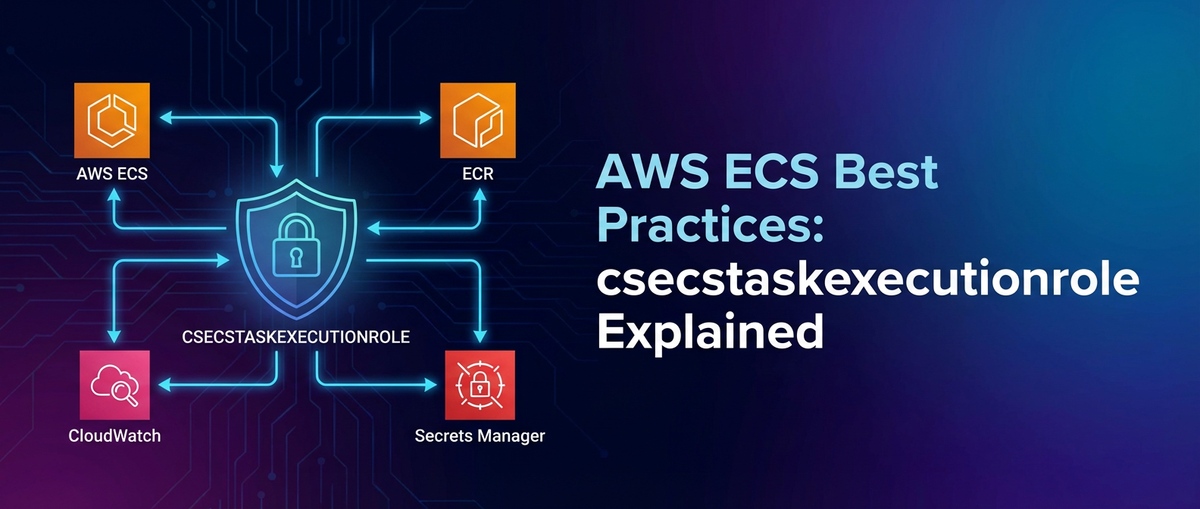
At its heart, the csecstaskexecutionrole is an IAM role that grants permissions to the Amazon ECS container agent and the Fargate infrastructure on behalf of your tasks. When you launch an ECS task, whether on EC2 instances or AWS Fargate, the underlying ECS infrastructure needs to perform several actions before your application code even begins to execute. These actions include:
- Pulling Container Images: Fetching the Docker image from Amazon Elastic Container Registry (ECR) or a private registry authenticated via AWS Secrets Manager or SSM Parameter Store.
- Pushing Container Logs: Sending application and system logs to Amazon CloudWatch Logs for centralized monitoring and analysis.
- Retrieving Secrets and Configuration: Injecting sensitive environment variables or configuration files from AWS Secrets Manager or SSM Parameter Store into the container.
- Downloading
awslogsConfiguration: If using advancedawslogsconfigurations stored in S3, the role needs access to retrieve these files. - Running Health Checks: Depending on the health check type, the ECS agent might need specific permissions to validate task health.
Without the csecstaskexecutionrole—or with an inadequately configured one—your tasks would simply fail to start, reporting errors related to permission denials for image pulls, log streams, or secret access. It acts as the operational identity for the ECS infrastructure as it manages the lifecycle of your containers, distinct from the identity your application within the container might assume for its own interactions with other AWS services. This critical distinction is a cornerstone of robust security posture in ECS, ensuring a clear separation of concerns between the infrastructure's operational needs and the application's runtime requirements.
csecstaskexecutionrole vs. Task Role: A Crucial Distinction
One of the most common sources of confusion for those new to AWS ECS is the difference between the Task Execution Role (which is the csecstaskexecutionrole) and the Task Role (also known as the IAM role for tasks). Understanding this distinction is paramount for implementing the principle of least privilege and designing secure architectures.
Task Execution Role(csecstaskexecutionrole): As discussed, this role is used by the ECS agent or Fargate infrastructure to execute the tasks. Its permissions are focused on actions necessary for task launch and management. Think of it as the identity of the "container orchestrator".Task Role(IAM Role for Tasks): This role is used by the application inside the container itself. Its permissions define what the application code can do. For example, if your application needs to write data to an S3 bucket, read items from a DynamoDB table, publish messages to an SQS queue, or invoke other AWS services like anAPI Gateway, these permissions would be granted to theTask Role, not theTask Execution Role. Think of it as the identity of the "application itself".
By separating these roles, you ensure that even if an attacker compromises your application, they only gain the permissions granted to the Task Role, not the broader permissions required for the ECS infrastructure to manage all tasks. Conversely, if there's a vulnerability in the ECS agent itself (highly unlikely given AWS's security practices, but a good mental model), it shouldn't be able to leverage broad application-specific permissions. This clear demarcation is a fundamental security best practice in the AWS ecosystem.
Core Components and Essential Permissions for csecstaskexecutionrole
To truly master the csecstaskexecutionrole, one must understand the specific AWS services it interacts with and the granular permissions required for each interaction. A properly configured role grants exactly what's needed, no more, no less.
1. Amazon Elastic Container Registry (ECR): Pulling Container Images
The most fundamental responsibility of the csecstaskexecutionrole is to enable the ECS agent to pull container images from ECR. Without these permissions, your tasks cannot start.
ecr:GetAuthorizationToken: Allows the ECS agent to retrieve an authentication token from ECR, which is then used to authenticate against the Docker registry. This token is temporary and ensures secure access.ecr:BatchCheckLayerAvailability: Checks if the necessary image layers are available in the repository.ecr:GetDownloadUrlForLayer: Retrieves the URL for downloading a specific image layer.ecr:BatchGetImage: Fetches information about one or more images, including image manifests.
For a task to pull images from ECR, the csecstaskexecutionrole must have permissions to the specific ECR repositories or, more broadly, to all ECR repositories in the account, depending on your security posture. Best practice dictates scoping these down to specific repository ARNs where possible, especially in environments with multiple teams or projects.
2. Amazon CloudWatch Logs: Pushing Container Logs
Centralized logging is non-negotiable for observability and troubleshooting in modern applications. ECS tasks are typically configured to send their stdout and stderr to CloudWatch Logs.
logs:CreateLogGroup: Allows the ECS agent to create a new log group in CloudWatch Logs if one doesn't already exist for the task's log configuration. While useful for initial setup, it's often better to pre-create log groups and only grantCreateLogStreamandPutLogEvents.logs:CreateLogStream: Enables the creation of a new log stream within a specified log group. Each task instance typically gets its own log stream.logs:PutLogEvents: The core permission for sending log data from the container to the designated CloudWatch Log Stream.
Similar to ECR, these permissions should ideally be scoped to specific CloudWatch Log Groups, identified by their ARNs, to prevent unintended log data exposure or accidental log group creation in sensitive areas.
3. AWS Systems Manager (SSM) Parameter Store & AWS Secrets Manager: Retrieving Sensitive Data
Storing sensitive information like database credentials, API keys, or configuration parameters directly in container images or task definitions is a severe anti-pattern. AWS provides SSM Parameter Store and Secrets Manager for securely managing these values. The csecstaskexecutionrole plays a critical part in injecting these secrets into your containers.
ssm:GetParameters: Allows retrieval of standard parameters from SSM Parameter Store.ssm:GetParametersByPath: Enables retrieval of parameters organized hierarchically by path.secretsmanager:GetSecretValue: Permits fetching the value of a secret from AWS Secrets Manager.kms:Decrypt: If your secrets in SSM Parameter Store or Secrets Manager are encrypted using a Customer Master Key (CMK) from AWS Key Management Service (KMS), thecsecstaskexecutionrolewill also needkms:Decryptpermission for that specific CMK.
These permissions are among the most sensitive. They should always be highly restricted, specifying the exact ARNs of the parameters or secrets the task is allowed to access. Using wildcard * for secrets access is a significant security risk.
4. Amazon S3: Advanced Logging or Private Registry Authentication
While less common for the default awslogs driver, S3 access can be required for the csecstaskexecutionrole in specific scenarios:
- Custom
awslogsConfiguration: If you're using a multi-lineawslogsconfiguration that relies on an S3 object, the role would needs3:GetObjectpermissions for that specific S3 object. - Private Registry Authentication: If you're using a private Docker registry (not ECR) and storing its credentials in S3, the role would need
s3:GetObjectto retrieve those credentials. This is generally less secure than using Secrets Manager/SSM.
Summary of Essential Permissions
The following table summarizes the most common and essential permissions typically associated with a csecstaskexecutionrole. This serves as a quick reference when crafting or reviewing your IAM policies.
| AWS Service | Required Actions | Description | Resource Scope Example | Security Note |
|---|---|---|---|---|
| ECR | ecr:GetAuthorizationToken |
Get authentication token for Docker login. | * (for any ECR registry) or specific arn:aws:ecr:... |
Consider scoping to specific ECR repositories. |
ecr:BatchCheckLayerAvailability |
Verify image layer availability. | arn:aws:ecr:region:account-id:repository/repo-name |
||
ecr:GetDownloadUrlForLayer |
Get URL for downloading image layers. | arn:aws:ecr:region:account-id:repository/repo-name |
||
ecr:BatchGetImage |
Retrieve image manifests. | arn:aws:ecr:region:account-id:repository/repo-name |
||
| CloudWatch Logs | logs:CreateLogGroup (Optional) |
Create a log group if it doesn't exist. | arn:aws:logs:region:account-id:log-group:log-group-name:* |
Pre-create log groups and omit this if possible. |
logs:CreateLogStream |
Create a log stream within a log group. | arn:aws:logs:region:account-id:log-group:log-group-name:* |
Scope to specific log groups. | |
logs:PutLogEvents |
Send log events to a log stream. | arn:aws:logs:region:account-id:log-group:log-group-name:* |
Scope to specific log groups. | |
| SSM Parameter Store | ssm:GetParameters |
Retrieve specific parameters by name. | arn:aws:ssm:region:account-id:parameter/path/to/parameter |
Crucial: Always scope to specific parameter ARNs. |
ssm:GetParametersByPath |
Retrieve parameters under a specific path. | arn:aws:ssm:region:account-id:parameter/path/to/* |
Use with caution; scope tightly. | |
| Secrets Manager | secretsmanager:GetSecretValue |
Retrieve the value of a secret. | arn:aws:secretsmanager:region:account-id:secret:secret-name-* |
Crucial: Always scope to specific secret ARNs. |
| KMS | kms:Decrypt (If encrypted secrets are used) |
Decrypt data encrypted with a KMS key. | arn:aws:kms:region:account-id:key/key-id |
Scope to specific CMKs used for secret encryption. |
Creating and Configuring csecstaskexecutionrole
The creation and configuration of the csecstaskexecutionrole is a standard IAM process. While AWS often provides default roles or quick-start options that attach the AmazonECSTaskExecutionRolePolicy managed policy, understanding how to customize and secure it is key.
Step-by-Step Creation (Conceptual)
- Navigate to IAM Console: In the AWS Management Console, go to the IAM service.
- Create New Role: Choose "Roles" from the left navigation and click "Create role."
- Select Trust Entity: For the "Trusted entity type," select "AWS service." Then, for the "Use case," search for "ECS Task" and select "Elastic Container Service Task." This automatically sets the correct trust policy, allowing the
ecs-tasks.amazonaws.comservice to assume this role.json { "Version": "2012-10-17", "Statement": [ { "Effect": "Allow", "Principal": { "Service": "ecs-tasks.amazonaws.com" }, "Action": "sts:AssumeRole" } ] } - Attach Permissions Policies: On the "Add permissions" page, search for and select the
AmazonECSTaskExecutionRolePolicymanaged policy. This policy provides a broad set of necessary permissions. For production environments, you will likely create a custom policy based on the principle of least privilege. - Name and Review: Give the role a descriptive name (e.g.,
ecsTaskExecutionRole-MyService) and an optional description. Review the attached policies and trust policy before creating the role.
Customizing for Least Privilege
While AmazonECSTaskExecutionRolePolicy is convenient, it often grants more permissions than strictly necessary for a single task. For production deployments, especially in multi-tenant environments or for sensitive applications, it is a critical best practice to create a custom inline or customer-managed policy that adheres to the principle of least privilege.
Example of a custom policy for a task executing in a specific ECR repo and pushing logs to a specific CloudWatch log group, retrieving a specific secret:
{
    "Version": "2012-10-17",
    "Statement": [
        {
            "Effect": "Allow",
            "Action": [
                "ecr:GetAuthorizationToken",
                "ecr:BatchCheckLayerAvailability",
                "ecr:GetDownloadUrlForLayer",
                "ecr:BatchGetImage"
            ],
            "Resource": [
                "arn:aws:ecr:REGION:ACCOUNT_ID:repository/my-app-repo"
            ]
        },
        {
            "Effect": "Allow",
            "Action": [
                "logs:CreateLogStream",
                "logs:PutLogEvents"
            ],
            "Resource": [
                "arn:aws:logs:REGION:ACCOUNT_ID:log-group:/ecs/my-app-logs:*"
            ]
        },
        {
            "Effect": "Allow",
            "Action": [
                "secretsmanager:GetSecretValue"
            ],
            "Resource": [
                "arn:aws:secretsmanager:REGION:ACCOUNT_ID:secret:my-app/db-credentials-XXXXXX"
            ]
        },
        {
            "Effect": "Allow",
            "Action": [
                "kms:Decrypt"
            ],
            "Resource": [
                "arn:aws:kms:REGION:ACCOUNT_ID:key/KMS_KEY_ID_FOR_SECRETS"
            ]
        }
    ]
}
This tailored approach significantly reduces the attack surface. If this role were compromised, an attacker would only gain access to my-app-repo, /ecs/my-app-logs, and my-app/db-credentials, rather than all ECR repositories, all CloudWatch log groups, and all secrets in the entire AWS account. This granular control is fundamental to building a secure Open Platform.
Security Best Practices for csecstaskexecutionrole
The security of your csecstaskexecutionrole is paramount, as it directly impacts the integrity and availability of your containerized applications. Adhering to strict security best practices is crucial.
1. Principle of Least Privilege (PoLP)
This is the golden rule of IAM. Your csecstaskexecutionrole should only have the absolute minimum permissions required to perform its function.
- Avoid Wildcards (
*): Never use*for theResourceelement in your policy statements unless absolutely unavoidable (e.g., forecr:GetAuthorizationTokenin some multi-region setups, though even there, careful scoping is often possible). Always specify ARNs for ECR repositories, CloudWatch Log Groups, SSM parameters, and Secrets Manager secrets. - Action Granularity: Grant specific actions (e.g.,
logs:PutLogEvents) rather than broad service permissions (e.g.,logs:*). - Conditional Policies: For even finer control, consider using IAM condition keys. For instance, you could add conditions that limit access based on the source VPC or IP address, though this adds complexity and might not always be suitable for dynamically scaled container environments.
2. Managed Policies vs. Custom Policies
- Managed Policies: AWS managed policies like
AmazonECSTaskExecutionRolePolicyare convenient for quick setups and learning. However, they are designed to cover a broad range of use cases and often include permissions that your specific task doesn't need. They are suitable for development or test environments where agility trumps stringent security. - Custom Policies: For production environments, custom policies are almost always preferred. They allow you to define permissions precisely, aligning perfectly with the PoLP. While requiring more initial effort, the long-term security and maintainability benefits are substantial. As your services evolve, review and update these custom policies.
3. Secure Secrets Management
The csecstaskexecutionrole's ability to retrieve secrets means it's a critical link in your secrets management chain.
- Utilize AWS Secrets Manager or SSM Parameter Store: Never hardcode credentials in your images or task definitions. Leverage these services for all sensitive data.
- KMS Encryption: Always encrypt your secrets using AWS KMS. Ensure your
csecstaskexecutionrolehas explicitkms:Decryptpermissions for the specific KMS key used to encrypt those secrets. - Rotation: Implement regular secret rotation (managed automatically by Secrets Manager for many services). This minimizes the window of exposure if a secret is compromised.
4. Monitoring and Logging
Visibility into how your csecstaskexecutionrole is being used (or misused) is crucial for security and compliance.
- AWS CloudTrail: CloudTrail logs all API calls made to AWS services. Monitor CloudTrail logs for events related to
sts:AssumeRole(for thecsecstaskexecutionrole) and any of the actions it's permitted to perform (e.g.,ecr:Get*,logs:PutLogEvents,secretsmanager:GetSecretValue). Set up CloudWatch Alarms or Security Hub insights for suspicious activity. - CloudWatch Logs: Ensure your container logs are flowing correctly to CloudWatch. This helps in diagnosing issues related to permissions and understanding your application's behavior.
- AWS Config: Use AWS Config rules to continuously monitor your IAM role configurations. For example, you can set rules to detect if your
csecstaskexecutionrolehas overly permissive*actions.
5. Regular Audits and Reviews
IAM policies are not set-it-and-forget-it. Regularly review your csecstaskexecutionrole's permissions:
- Periodically Review Policies: As applications evolve, their permission requirements change. Conduct quarterly or bi-annual reviews of all IAM roles, especially high-privilege ones like the
csecstaskexecutionrole, to remove outdated or unnecessary permissions. - IAM Access Analyzer: Utilize IAM Access Analyzer to identify unintended external access to your resources and to fine-tune your policies based on actual usage.
- Automated Scans: Integrate security tools into your CI/CD pipeline that scan IAM policies for best practice violations.
Advanced Scenarios and Considerations
Beyond the basics, several advanced scenarios require careful consideration when configuring your csecstaskexecutionrole.
Private Registries and Cross-Account ECR Access
While ECR is the preferred image registry for ECS, some organizations use private registries (e.g., Docker Hub private repositories, Artifactory).
- Private Registry Authentication: If using a private registry, you'll store its credentials (username/password or authentication token) in AWS Secrets Manager or SSM Parameter Store. The
csecstaskexecutionrolethen needs permissions to retrieve these secrets. - Cross-Account ECR Access: If your images are in an ECR repository in a different AWS account (e.g., a shared image account), your
csecstaskexecutionrolein the task account will need permissions to pull from that cross-account ECR. This involves:- The
csecstaskexecutionrolehaving the necessaryecr:GetAuthorizationToken,ecr:BatchCheckLayerAvailability, etc., actions. - The ECR repository policy in the source account explicitly granting permission to the
csecstaskexecutionrole(or the account itself) from the destination account. This is a common pattern for centralizing image management.
- The
Custom Log Drivers and Storage
While awslogs is the default and most common log driver, ECS supports others (e.g., Splunk, Gelf, Fluentd).
- Permissions for Custom Drivers: If you use a custom log driver, your
csecstaskexecutionrolewill need specific permissions to interact with the chosen log destination. For example, a Fluentd driver pushing to an S3 bucket might requires3:PutObjectpermissions. Always consult the documentation for your chosen log driver for exact requirements. - Fargate vs. EC2 Launch Types: The fundamental role of
csecstaskexecutionroleremains consistent across Fargate and EC2 launch types. However, on EC2, the ECS agent runs on EC2 instances you manage, whereas Fargate abstracts the underlying infrastructure. Fargate's managed nature often simplifies some aspects but doesn't diminish the need for a well-configuredcsecstaskexecutionrole.
Networking Considerations
Security extends beyond IAM. Network configuration plays a role in how your csecstaskexecutionrole interacts with AWS services.
- VPC Endpoints: For enhanced security and reduced network latency, configure VPC Endpoints (interface endpoints) for services like ECR, SSM, S3, Secrets Manager, CloudWatch Logs, and KMS. This allows your ECS tasks to communicate with these AWS services privately within your VPC, without traversing the public internet. This removes a potential attack vector and ensures all traffic remains within the AWS network.
APIPark is a high-performance AI gateway that allows you to securely access the most comprehensive LLM APIs globally on the APIPark platform, including OpenAI, Anthropic, Mistral, Llama2, Google Gemini, and more.Try APIPark now! 👇👇👇
Troubleshooting Common csecstaskexecutionrole Issues
Misconfigurations of the csecstaskexecutionrole are a frequent cause of ECS task failures. Here are common issues and how to troubleshoot them:
1. "Unable to pull image" Errors
- Symptom: Task fails to start with messages like "CannotPullContainerError", "No such image", or "Access Denied" from ECR.
- Troubleshooting:
- ECR Permissions: Check if
csecstaskexecutionrolehasecr:GetAuthorizationToken,ecr:BatchCheckLayerAvailability,ecr:GetDownloadUrlForLayer,ecr:BatchGetImagefor the specific ECR repository. - Repository Policy: If pulling from a cross-account ECR, ensure the ECR repository policy in the source account grants access to the
csecstaskexecutionroleor the destination account. - Network Connectivity: Verify that the task's network configuration (VPC, security groups, subnets, NACLs) allows outbound connections to ECR endpoints. If using VPC Endpoints, ensure they are configured correctly and accessible.
- Image Tag/Digest: Double-check the image tag or digest in your task definition.
- ECR Permissions: Check if
2. "Log stream creation failed" or "Permission denied for logs" Errors
- Symptom: Task starts but no logs appear in CloudWatch, or the task fails to start with log-related permission errors.
- Troubleshooting:
- CloudWatch Permissions: Ensure
csecstaskexecutionrolehaslogs:CreateLogStreamandlogs:PutLogEventsfor the specified CloudWatch Log Group. Iflogs:CreateLogGroupis omitted, ensure the log group exists. - Log Group ARN: Verify the Log Group ARN in the policy matches the one configured in your task definition
logConfiguration. - Network Connectivity: Check network access to CloudWatch Logs endpoints.
- CloudWatch Permissions: Ensure
3. "Secrets injection failed" or "Access Denied to Parameter/Secret" Errors
- Symptom: Task fails to start or application crashes with errors indicating it cannot retrieve environment variables or files that were supposed to come from SSM or Secrets Manager.
- Troubleshooting:
- SSM/Secrets Manager Permissions: Confirm
csecstaskexecutionrolehasssm:GetParameters,ssm:GetParametersByPath, orsecretsmanager:GetSecretValuefor the exact ARNs of the parameters/secrets. Wildcards are particularly dangerous here. - KMS Permissions: If secrets are KMS-encrypted, ensure
csecstaskexecutionrolehaskms:Decryptfor the correct KMS key. - Secret/Parameter Existence: Verify the secrets/parameters actually exist and are named correctly.
- Task Definition Syntax: Double-check the
secretsorparameterssection in your task definition for correct syntax and references. - Network Connectivity: Ensure network access to SSM/Secrets Manager/KMS endpoints.
- SSM/Secrets Manager Permissions: Confirm
Debugging Tools
- AWS CLI: Use
aws ecs describe-tasksto get detailed information about failed tasks, including stop codes and reasons. - CloudTrail Event History: Search CloudTrail for
AccessDeniederrors around the time of the task failure, filtering by thecsecstaskexecutionroleARN. This provides granular detail on which specific permission was denied for which specific resource. - IAM Policy Simulator: Use the IAM Policy Simulator to test your
csecstaskexecutionroleagainst specific actions and resources. This is an invaluable tool for validating permissions before deployment. - ECS Exec: For Fargate and EC2 launch types with platform version 1.4.0 or later, you can use ECS Exec to directly shell into a running container to inspect its environment and troubleshoot issues from within.
Integrating with an Open Platform Ecosystem
The csecstaskexecutionrole is a vital security and operational building block within any modern, distributed application architecture, particularly those embracing an Open Platform strategy. In such environments, applications are often composed of numerous microservices, each potentially running as an ECS task. These microservices frequently communicate via APIs, exposing functionalities that internal teams or even external partners consume.
A securely configured csecstaskexecutionrole ensures the foundational elements of these microservices—image pulling, logging, secret management—are handled robustly. This contributes directly to the reliability and security of the API endpoints these services expose. For example, if a csecstaskexecutionrole fails to retrieve database credentials, the microservice providing a core API will fail to start, rendering that API unavailable. Conversely, an overly permissive csecstaskexecutionrole could become an attack vector, undermining the entire Open Platform's security.
As organizations scale their Open Platform initiatives, the proliferation of microservices and APIs introduces new challenges in management, governance, and observability. While csecstaskexecutionrole secures the execution context of individual services, the broader ecosystem requires solutions for managing the APIs themselves. This is where an API gateway becomes indispensable. An API gateway acts as a single entry point for all API requests, providing services like routing, load balancing, authentication, authorization, rate limiting, and analytics.
For organizations building an Open Platform with numerous microservices exposing APIs, managing these APIs efficiently becomes paramount. This is where tools like APIPark, an Open Source AI Gateway and API Management Platform, can play a crucial role. APIPark helps centralize API governance, from design to publication and invocation, including securing API access and providing analytical insights, complementing the foundational security provided by roles like csecstaskexecutionrole for the underlying services. While the csecstaskexecutionrole ensures your containerized API services can securely run and access their operational dependencies, APIPark provides the layer of management and security for how those API services are exposed and consumed across your Open Platform. This two-pronged approach—secure infrastructure execution combined with robust API governance—is essential for building truly resilient and scalable modern architectures.
Example Scenario: Deploying a Web Service with ECS Fargate
Let's walk through a practical example of deploying a simple web service using ECS Fargate, emphasizing the role of csecstaskexecutionrole.
Consider a Python Flask application that serves a simple "Hello World" API. This application's Docker image is stored in ECR, its logs go to CloudWatch, and it retrieves a secret API key from AWS Secrets Manager for an external service integration (even if our simple Flask app doesn't use it, it demonstrates the pattern).
- Container Image:
- A
Dockerfilebuilds a Python application image. - This image is pushed to
my-account-id.dkr.ecr.us-east-1.amazonaws.com/flask-hello-world. - The
csecstaskexecutionroleneedsecr:GetAuthorizationToken,ecr:BatchCheckLayerAvailability,ecr:GetDownloadUrlForLayer,ecr:BatchGetImagefor this specific ECR repository.
- A
- Task Definition:A snippet from the task definition might look like this:
json { "containerDefinitions": [ { "name": "flask-app", "image": "my-account-id.dkr.ecr.us-east-1.amazonaws.com/flask-hello-world:latest", "portMappings": [ { "containerPort": 80, "hostPort": 80, "protocol": "tcp" } ], "logConfiguration": { "logDriver": "awslogs", "options": { "awslogs-group": "/techblog/en/ecs/flask-hello-world", "awslogs-region": "us-east-1", "awslogs-stream-prefix": "flask-app" } }, "secrets": [ { "name": "MY_API_KEY", "valueFrom": "arn:aws:secretsmanager:us-east-1:my-account-id:secret:flask-app/external-api-key-XXXXXX" } ] } ], "family": "flask-hello-world-task-def", "executionRoleArn": "arn:aws:iam::my-account-id:role/ecsTaskExecutionRole-FlaskApp", "requiresCompatibilities": ["FARGATE"], "cpu": "256", "memory": "512" // ... other task definition properties }- A task definition (e.g.,
flask-hello-world-task-def) specifies the container, image, port mappings, and logging configuration. - Crucially, it references the
csecstaskexecutionrolefortaskRoleArnand theTask Role(if the application itself needed AWS permissions) fortaskRoleArn. For this example, let's assumetaskRoleArnis also thecsecstaskexecutionrole. - It defines a
logConfigurationusing theawslogsdriver, sending logs to/ecs/flask-hello-world. - It specifies a secret named
MY_API_KEYto be injected as an environment variable, pointing toarn:aws:secretsmanager:us-east-1:my-account-id:secret:flask-app/external-api-key-XXXXXX.
- A task definition (e.g.,
ecsTaskExecutionRole-FlaskAppIAM Role:- This is our
csecstaskexecutionrole. - Its trust policy allows
ecs-tasks.amazonaws.comto assume it. - Its permissions policy explicitly grants:
- ECR pull access for
arn:aws:ecr:us-east-1:my-account-id:repository/flask-hello-world. - CloudWatch Logs
CreateLogStreamandPutLogEventsforarn:aws:logs:us-east-1:my-account-id:log-group:/ecs/flask-hello-world:*. - Secrets Manager
GetSecretValueforarn:aws:secretsmanager:us-east-1:my-account-id:secret:flask-app/external-api-key-XXXXXX. - KMS
Decryptfor the specific key used to encrypt the secret.
- ECR pull access for
- This is our
When the ECS scheduler launches a task based on this definition, it assumes the ecsTaskExecutionRole-FlaskApp. This role allows it to: * Authenticate with ECR and pull the flask-hello-world:latest image. * Create a log stream (flask-app/task-id) in the /ecs/flask-hello-world log group. * Retrieve the flask-app/external-api-key secret from Secrets Manager and inject its value as the MY_API_KEY environment variable into the running container. * Continuously push application logs to the created log stream.
This example clearly demonstrates how each facet of the csecstaskexecutionrole is integral to a successful, secure, and observable ECS deployment.
Performance and Operational Excellence
The correct configuration of the csecstaskexecutionrole extends beyond security and basic functionality; it significantly impacts the performance and operational excellence of your ECS deployments.
- Faster Deployments: When
csecstaskexecutionrolepermissions are correctly defined and scoped, tasks can start faster. The ECS agent doesn't waste time trying to access unauthorized resources or failing repeatedly due to permission errors. This is crucial for rapid scaling and quick recovery from failures. - Reduced Operational Overhead: A well-understood and systematically applied
csecstaskexecutionroleconfiguration minimizes "permission denied" tickets for operations teams. Automated processes for creating and updating roles ensure consistency and reduce manual errors. - Scalability and Resilience: In highly dynamic environments where tasks are constantly being launched, stopped, and scaled, the
csecstaskexecutionroleensures that every new instance can seamlessly acquire its necessary operational context without human intervention. This forms a bedrock for building highly scalable and resilient architectures. - Cost Efficiency: While not a direct cost factor, failed deployments or prolonged troubleshooting due to IAM issues translate into wasted compute time and engineering hours. By streamlining the permission model, organizations can optimize resource utilization and engineering productivity.
Embracing a comprehensive strategy for managing csecstaskexecutionrole—from initial creation to ongoing auditing and refinement—is a testament to an organization's commitment to operational excellence within its Open Platform ecosystem. It demonstrates a mature approach to cloud resource management, ensuring that the underlying infrastructure provides a stable, secure, and efficient foundation for all containerized applications and the APIs they expose.
Conclusion
The csecstaskexecutionrole is far more than just another IAM artifact; it is a critical enabler for all AWS ECS tasks, acting as the fundamental interface between the ECS orchestration layer and essential AWS services. Its meticulous configuration directly impacts the security, reliability, and operational efficiency of your containerized applications, forming a cornerstone for any robust Open Platform strategy.
By deeply understanding its purpose, distinguishing it from the Task Role, and diligently applying the principle of least privilege to its permissions, you can significantly reduce your attack surface and enhance the resilience of your deployments. Whether it's securely pulling images from ECR, centralizing logs in CloudWatch, or injecting sensitive credentials from Secrets Manager, the csecstaskexecutionrole ensures these foundational operations occur seamlessly and securely.
Adopting best practices—from creating custom, granular policies and employing advanced secrets management techniques to diligent monitoring and regular audits—is not merely a suggestion but a necessity for building future-proof, scalable, and secure containerized applications on AWS. In an ecosystem where microservices communicate via APIs and form complex Open Platform architectures, the unglamorous yet utterly critical csecstaskexecutionrole underpins the entire edifice, making it possible for powerful tools like an API gateway to manage the interactions of your services confidently and securely. Mastering this role is an investment in the long-term health and success of your cloud-native journey.
Frequently Asked Questions (FAQs)
1. What is the primary difference between csecstaskexecutionrole and the Task Role (IAM role for tasks)? The csecstaskexecutionrole is used by the AWS ECS agent or Fargate infrastructure to run and manage the task, performing actions like pulling images, pushing logs, and retrieving secrets. The Task Role is used by the application code inside the container to interact with other AWS services (e.g., S3, DynamoDB, API Gateway). They serve distinct purposes, and separating them is a critical security best practice for the principle of least privilege.
2. Why is using AmazonECSTaskExecutionRolePolicy for csecstaskexecutionrole generally not recommended for production environments? The AmazonECSTaskExecutionRolePolicy is an AWS managed policy designed to cover a broad range of use cases, often granting more permissions than a specific task actually needs (e.g., full access to ECR or CloudWatch Logs). While convenient for quick setups, this violates the principle of least privilege. For production, it's best to create a custom policy that grants only the necessary, scoped-down permissions to reduce the attack surface.
3. How does csecstaskexecutionrole help with secrets management in ECS? The csecstaskexecutionrole is granted permissions to retrieve secrets from AWS Secrets Manager or parameters from AWS Systems Manager Parameter Store. When a task starts, the ECS agent uses this role to fetch the specified sensitive values and injects them as environment variables or files into the container, preventing hardcoding credentials directly in images or task definitions. If the secrets are KMS-encrypted, the role also needs kms:Decrypt permissions.
4. What are the key troubleshooting steps if my ECS task fails due to csecstaskexecutionrole issues? First, check the task's stop reason and error messages using aws ecs describe-tasks. Then, verify the csecstaskexecutionrole's IAM policy for explicit permissions related to the failing operation (e.g., ECR pull, CloudWatch log push, Secrets Manager access). Use AWS CloudTrail Event History to look for AccessDenied errors associated with the role, and the IAM Policy Simulator to test policy effectiveness. Also, ensure network connectivity to the relevant AWS service endpoints.
5. How does csecstaskexecutionrole contribute to an Open Platform strategy involving APIs? In an Open Platform architecture built with microservices, ECS tasks are the runtime environment for many API services. A securely configured csecstaskexecutionrole ensures these services can reliably perform their foundational operations—like pulling trusted images, logging activity, and accessing secure configurations. This foundational security and reliability are crucial for the stability and trustworthiness of the APIs these services expose. While the csecstaskexecutionrole secures the execution of the service, an API gateway (like APIPark) then manages the secure exposure and consumption of those APIs, collectively contributing to a robust Open Platform.
🚀You can securely and efficiently call the OpenAI API on APIPark in just two steps:
Step 1: Deploy the APIPark AI gateway in 5 minutes.
APIPark is developed based on Golang, offering strong product performance and low development and maintenance costs. You can deploy APIPark with a single command line.
curl -sSO https://download.apipark.com/install/quick-start.sh; bash quick-start.sh

In my experience, you can see the successful deployment interface within 5 to 10 minutes. Then, you can log in to APIPark using your account.

Step 2: Call the OpenAI API.