Mastering redirect provider authorization.json
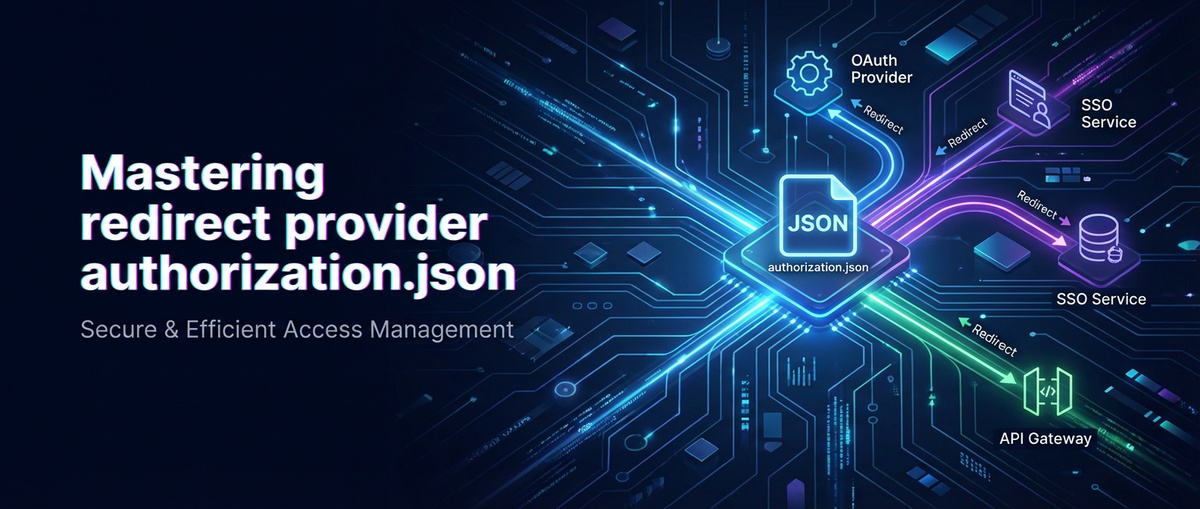


The digital landscape is a complex tapestry woven from interconnected services, each communicating through carefully choreographed exchanges of data and identity. At the heart of this intricate dance lies authorization – the gatekeeper determining who can access what resources. While the principles of authorization are universal, their implementation in distributed systems, particularly those leveraging redirect-based authentication flows, presents a unique set of challenges and opportunities for robust security. This comprehensive guide delves into the nuances of "Mastering redirect provider authorization.json," exploring how a meticulously crafted configuration, often encapsulated within such a file, becomes the linchpin for secure, scalable, and resilient access management in modern api-driven architectures.
The journey to mastery begins with a profound understanding of the underlying protocols and the role of each component in the authorization chain. We will dissect the architectural patterns that necessitate a "redirect provider," examine the hypothetical yet immensely practical construct of an authorization.json file, and uncover the critical role of an api gateway in enforcing these configurations. By the end, you will possess the knowledge to architect, implement, and secure authorization flows that are not only compliant with industry best practices but also adaptable to the ever-evolving threat landscape.
The Foundational Pillars: Understanding Modern Authorization Flows
Before we immerse ourselves in the specifics of authorization.json and the redirect provider, it is imperative to establish a solid understanding of the contemporary authorization frameworks that underpin secure web and mobile applications. The vast majority of modern authentication and authorization relies on two core specifications: OAuth 2.0 and OpenID Connect (OIDC). These protocols dictate how user identity and permissions are delegated and verified across disparate services, often involving complex redirect mechanisms.
OAuth 2.0: The Delegation Framework
OAuth 2.0 is an authorization framework that enables an application (the Client) to obtain limited access to an HTTP service (the Resource Server) on behalf of a user (the Resource Owner). It's crucial to understand that OAuth 2.0 is not an authentication protocol; it's about authorization – granting permission. The user authenticates with an Authorization Server, and then the Client is granted an "access token" to perform actions on the user's behalf.
The key roles in an OAuth 2.0 flow include:
- Resource Owner: The user who owns the protected resources and grants access.
- Client: The application requesting access to the Resource Owner's protected resources. This is often the "redirect provider" in our context, as it initiates the authorization request and receives the redirect.
- Authorization Server: The server that authenticates the Resource Owner, issues access tokens, and manages permissions.
- Resource Server: The server hosting the protected resources, capable of accepting and responding to protected resource requests using access tokens.
Within OAuth 2.0, several grant types (also known as authorization flows) exist, each suited for different client types and security contexts. The most common and secure for web applications is the Authorization Code flow, which inherently involves redirects.
The Authorization Code Flow: A Deep Dive
The Authorization Code flow is the recommended method for confidential clients (applications capable of securely storing a client secret) and even public clients (like single-page applications or mobile apps) when combined with PKCE (Proof Key for Code Exchange). It involves a series of redirects and server-to-server communications, making it robust against certain client-side attacks.
- Client initiates authorization: The Client application redirects the user's browser to the Authorization Server's
/authorizeendpoint. This redirect URL includes parameters such asclient_id,redirect_uri,scope(the permissions requested), andstate(a CSRF protection mechanism). - Resource Owner authenticates and consents: The Authorization Server authenticates the Resource Owner (e.g., username/password, MFA) and, if required, prompts them to grant consent for the Client to access their resources.
- Authorization Server redirects back: Upon successful authentication and consent, the Authorization Server redirects the user's browser back to the Client's pre-registered
redirect_uri. This redirect includes anauthorization_codeand the originalstateparameter. - Client exchanges code for tokens: The Client, receiving the
authorization_code, makes a direct, server-to-server (backend) request to the Authorization Server's/tokenendpoint. This request includes theauthorization_code,client_id,client_secret(if applicable), andredirect_uri. - Authorization Server issues tokens: The Authorization Server validates the code and client credentials, then issues an
access_token(for accessing protected resources) and often arefresh_token(for obtaining new access tokens without re-authenticating the user) and anid_token(if OpenID Connect is also in play). - Client accesses resources: The Client uses the
access_tokento make requests to the Resource Server, which validates the token and grants access.
The authorization.json file, as we will conceptualize it, plays a pivotal role in configuring the client for steps 1 and 4, ensuring it knows where to send authorization requests and where to receive the redirect.
OpenID Connect: Building Identity on OAuth 2.0
While OAuth 2.0 is about authorization, OpenID Connect is an identity layer built on top of OAuth 2.0. It allows clients to verify the identity of the Resource Owner based on authentication performed by an Authorization Server and to obtain basic profile information about the Resource Owner in an interoperable and REST-like manner. The key artifact of OIDC is the id_token – a JSON Web Token (JWT) that contains claims (attributes) about the authenticated user.
OIDC leverages the same OAuth 2.0 flows but adds specific scopes (like openid and profile) and introduces the id_token as proof of authentication. The integration of OIDC with OAuth 2.0 is critical for scenarios where an application needs not only authorization to access resources but also verifiable information about the user's identity. This means our authorization.json might also need to define OIDC-specific parameters and expected claims.
Deconstructing the "Redirect Provider": Role and Responsibilities
The term "redirect provider" in our context refers primarily to the Client application that initiates the authorization request and is responsible for handling the subsequent redirect from the Authorization Server. This client can manifest in various forms:
- Traditional Web Applications (Server-side rendered): Where the backend server initiates the OAuth flow, manages secrets, and handles token exchange. The
authorization.jsonwould likely reside on the server. - Single-Page Applications (SPAs) / Client-side rendered applications: Where JavaScript in the browser initiates the flow. For security, these must use PKCE, and while they don't hold client secrets,
authorization.jsonwould still define endpoints andredirect_uris. - Mobile Applications: Similar to SPAs, they are public clients and must use PKCE. The native application handles the redirect via custom URI schemes or universal links.
- API Gateways or Identity Brokers: In complex enterprise architectures, an
api gatewayor a dedicated identity broker service might act as a redirect provider, abstracting the authentication logic from downstream microservices. This is where the concept of agatewaybecomes particularly powerful, centralizing identity management.
Regardless of its form, the redirect provider has critical responsibilities that must be meticulously configured to ensure security and functionality:
- Initiating the Authorization Request: Constructing the correct URL for the Authorization Server, including
client_id,redirect_uri,scope, andstate. - Receiving and Validating the Redirect: Having an endpoint or mechanism to catch the incoming redirect from the Authorization Server, extracting the
authorization_codeand validating thestateparameter. - Exchanging the Code for Tokens: Making a secure backend request to the Authorization Server's token endpoint to obtain access, refresh, and ID tokens. This step is where confidential clients use their
client_secret. - Managing Tokens: Securely storing, using, and refreshing tokens.
- Handling Errors: Gracefully managing error responses from the Authorization Server.
The authorization.json file serves as the blueprint for these responsibilities, providing all the necessary configuration parameters in a structured and maintainable format.
The authorization.json Blueprint: A Conceptual Framework for Configuration
While "authorization.json" isn't a universally standardized file name, it serves as an excellent conceptual model for centralizing the crucial configuration elements required by a redirect provider. This file would encapsulate all the parameters needed to successfully interact with an Authorization Server, thereby simplifying deployment, enhancing security, and standardizing authorization logic across different services or environments.
Let's hypothesize the structure and content of such a file, building upon the requirements of OAuth 2.0 and OpenID Connect:
{
  "authorizationServer": {
    "issuer": "https://your-auth-server.com/oauth2/",
    "authorizationEndpoint": "https://your-auth-server.com/oauth2/authorize",
    "tokenEndpoint": "https://your-auth-server.com/oauth2/token",
    "jwksUri": "https://your-auth-server.com/oauth2/v1/keys",
    "userInfoEndpoint": "https://your-auth-server.com/oauth2/userinfo",
    "endSessionEndpoint": "https://your-auth-server.com/oauth2/logout"
  },
  "clientConfiguration": {
    "clientId": "your-client-id-from-auth-server",
    "clientSecret": "your-client-secret-if-confidential",
    "redirectUris": [
      "https://your-app.com/callback",
      "https://your-app.com/another-callback"
    ],
    "postLogoutRedirectUris": [
      "https://your-app.com/logged-out"
    ],
    "defaultScope": "openid profile email api.read api.write",
    "responseType": "code",
    "grantType": "authorization_code",
    "pkceRequired": true,
    "tokenEndpointAuthMethod": "client_secret_post",
    "defaultMaxAge": 3600,
    "issueRefreshToken": true
  },
  "securityPolicies": {
    "stateParameterLength": 32,
    "nonceParameterLength": 32,
    "requireHttpsRedirectUris": true,
    "disableHttpCaching": true,
    "jwtValidationSettings": {
      "audience": "your-client-id-from-auth-server",
      "leeway": 60,
      "requireExpiration": true,
      "requireIssuer": true
    }
  },
  "errorHandling": {
    "defaultErrorRedirect": "https://your-app.com/error",
    "customErrorMessages": {
      "access_denied": "You denied access to our application. Please try again.",
      "invalid_scope": "Requested permissions are invalid."
    },
    "logLevelOnError": "ERROR"
  },
  "deploymentEnvironment": "production"
}
Let's break down each section of this hypothetical authorization.json:
1. authorizationServer
This section defines the core endpoints and metadata of the Authorization Server (IdP). These values are typically discovered via the OIDC Discovery Endpoint (often /.well-known/openid-configuration), but hardcoding them or referencing them from a config file provides explicit control and allows for overrides.
issuer: The URL of the Authorization Server, used for validating theissclaim in ID Tokens.authorizationEndpoint: The URL where the client redirects the user to initiate the authorization flow.tokenEndpoint: The URL where the client exchanges the authorization code for tokens.jwksUri: The URL for the JSON Web Key Set, containing the public keys used by the Authorization Server to sign ID Tokens. Critical for verifying JWT signatures.userInfoEndpoint: (OIDC specific) The URL to retrieve user profile information after obtaining an access token.endSessionEndpoint: (OIDC specific) The URL to redirect the user for logging out of the Authorization Server, potentially performing single logout.
2. clientConfiguration
This section holds all the parameters specific to the client application (the redirect provider) as registered with the Authorization Server.
clientId: The unique identifier for the client application. This is public knowledge but crucial for the Authorization Server to identify the requesting client.clientSecret: (Confidential clients only) A secret string used to authenticate the client during token exchange. Must be kept absolutely confidential.redirectUris: An array of URLs where the Authorization Server is permitted to redirect the user after authorization. This is one of the most critical security parameters; any mismatch here should result in an error.postLogoutRedirectUris: (OIDC specific) Similar toredirectUrisbut for post-logout redirects.defaultScope: A space-separated string of permissions the client typically requests (e.g.,openid profile email).openidis required for OIDC.responseType: Defines the desired response from the Authorization Server (e.g.,codefor Authorization Code flow).grantType: Specifies the OAuth 2.0 grant type being used (e.g.,authorization_code).pkceRequired: A boolean indicating whether PKCE (Proof Key for Code Exchange) must be used. Highly recommended for public clients (SPAs, mobile apps) and good practice for confidential clients too.tokenEndpointAuthMethod: How the client authenticates at the token endpoint (e.g.,client_secret_post,client_secret_basic).defaultMaxAge: (OIDC specific) Maximum allowable elapsed time in seconds since the Resource Owner's authentication.issueRefreshToken: A boolean indicating whether the client expects to receive a refresh token.
3. securityPolicies
This section outlines specific security configurations and best practices that the redirect provider should adhere to, reinforcing the security posture beyond just protocol adherence.
stateParameterLength: Minimum required length for thestateparameter to prevent CSRF attacks. A longer, cryptographically random string is better.nonceParameterLength: (OIDC specific) Minimum required length for thenonceparameter in the authorization request to mitigate replay attacks, particularly when usingid_token.requireHttpsRedirectUris: Boolean to enforce that allredirectUrismust use HTTPS. This is fundamental for security.disableHttpCaching: Boolean to instruct the client to add HTTP headers to prevent caching of sensitive responses.jwtValidationSettings: Sub-object for configuring how JWTs (especially ID Tokens and potentially Access Tokens) should be validated.audience: The expectedaudclaim in the JWT.leeway: Time in seconds to account for clock skew when validatingexpandnbfclaims.requireExpiration: Ensure the JWT has anexpclaim.requireIssuer: Ensure the JWT has anissclaim.
4. errorHandling
A robust application must gracefully handle errors in the authorization flow. This section provides configurations for how the redirect provider should respond to various authorization-related errors.
defaultErrorRedirect: A fallback URL for generic errors.customErrorMessages: A map of standard OAuth/OIDC error codes to user-friendly messages.logLevelOnError: The logging level to use when an authorization error occurs.
5. deploymentEnvironment
A simple indicator of the current deployment environment (e.g., development, staging, production), allowing the application to apply environment-specific logic or validations, such as stricter logging or different endpoints for development environments.
By consolidating these parameters into a structured authorization.json, the redirect provider gains a single source of truth for its authorization logic. This promotes consistency, reduces configuration drift, and makes it easier to audit and manage security policies.
Implementing authorization.json in Practice: Consumption and Lifecycle
The mere existence of an authorization.json file is insufficient; its effective implementation involves how it is consumed, managed, and integrated into the application's lifecycle. The approach will vary depending on the client type and the architecture.
Client-Side vs. Server-Side Consumption
Server-Side Applications (Confidential Clients): For traditional web applications or backend services acting as redirect providers, the authorization.json would typically be loaded at application startup. Frameworks like Spring Boot, Node.js with Express, or ASP.NET Core provide robust configuration management systems that can easily parse JSON files.
- Loading: The file is read from the filesystem, environment variables, or a configuration server.
- Initialization: An authorization client library (e.g., Passport.js in Node, Spring Security OAuth in Java) is initialized with these parameters.
- Runtime: The application uses these configured parameters to construct redirect URLs, make token exchange requests, and validate tokens.
- Secrets: The
clientSecretand other sensitive information must be protected. Environment variables, secret managers (like AWS Secrets Manager, HashiCorp Vault), or Kubernetes secrets are preferred over direct inclusion in version control.
Client-Side Applications (Public Clients - SPAs, Mobile Apps): For SPAs and mobile apps, the situation is different. They cannot securely store a clientSecret. The authorization.json in this context would contain only public information (endpoints, clientId, redirectUris, scope) and omit clientSecret. It would be bundled with the application or fetched from a public endpoint.
- Loading: The JavaScript application (or mobile SDK) loads the public parameters.
- Initialization: An OAuth/OIDC client library for JavaScript (e.g.,
oidc-client-js) or mobile SDK is initialized. - PKCE: PKCE is paramount here. The client library dynamically generates
code_verifierandcode_challengefor each authorization request. - Security: Even public parameters need protection from tampering. Content Security Policy (CSP) and subresource integrity (SRI) can help for web apps.
Dynamic Configuration and Environment Variables
While a static authorization.json is useful, dynamic configuration offers greater flexibility, especially in microservices architectures or cloud-native deployments.
- Environment Variables: Overriding values in
authorization.jsonwith environment variables (e.g.,AUTH_SERVER_ISSUER,CLIENT_ID) is a common pattern for environment-specific settings. - Configuration Servers: Centralized configuration services (e.g., Spring Cloud Config, Consul, AWS AppConfig) can serve the
authorization.jsoncontent or individual parameters to clients at runtime, allowing for hot reloading and easier management across many services. - Discovery Endpoint: For the Authorization Server details, leveraging the OIDC Discovery Endpoint is a best practice. The
authorization.jsoncould then primarily focus on client-specific settings, while the application dynamically fetches server metadata.
The Role of Version Control and Auditing
The authorization.json file, whether static or templated, should be managed under version control. This provides:
- History: A clear audit trail of all changes to authorization configurations.
- Collaboration: Teams can collaborate on and review changes.
- Rollback: The ability to revert to previous known-good configurations.
However, sensitive information like clientSecret should never be committed to version control directly. Placeholders or references to secret management systems are the appropriate approach. Regular security audits of this configuration file are also essential to identify potential vulnerabilities or misconfigurations.
Security Best Practices and Common Pitfalls When Mastering authorization.json
Mastering authorization extends beyond merely populating an authorization.json file; it demands a deep commitment to security best practices. Misconfigurations can lead to severe vulnerabilities, compromising user data and system integrity.
Secure Redirect URIs: The Gatekeeper
The redirectUris in your authorization.json are arguably the most critical security configuration.
- Strict Matching: The Authorization Server must perform an exact match of the
redirect_urisent in the authorization request against its pre-registered list. Wildcards should be avoided or used with extreme caution (e.g., for development environments only, or with very strict domain limitations). - HTTPS Only: Always require HTTPS for
redirectUris. HTTP exposes authorization codes and tokens to eavesdropping. - Avoid Localhost Redirects in Production: While useful for development, ensure localhost
redirectUrisare stripped from production configurations. - Unique Redirects: Ideally, each client application should have a unique, dedicated
redirect_uri. - No Fragment URIs: OAuth 2.0 and OIDC specify that fragments (
#) are not allowed inredirect_uris to prevent fragment injection attacks.
Pitfall: Using broad redirect_uri patterns (e.g., https://*.example.com/*) or allowing HTTP redirects, which can enable attackers to intercept authorization codes.
State Parameter: CSRF Protection and Session Management
The state parameter is a mandatory component of the Authorization Code flow and is crucial for preventing Cross-Site Request Forgery (CSRF) attacks.
- Cryptographically Random: The client must generate a cryptographically strong, unguessable random string for the
stateparameter. Its length (as defined instateParameterLengthinauthorization.json) should be sufficient (e.g., 32+ bytes). - Per-Request: A unique
stateparameter should be generated for each authorization request. - Validation: Upon receiving the redirect, the client must validate that the
stateparameter returned by the Authorization Server matches the one sent in the original request. Mismatch should result in an error.
Pitfall: Not validating the state parameter, or using a predictable state value, which makes the application vulnerable to CSRF.
PKCE (Proof Key for Code Exchange): Essential for Public Clients
PKCE is an extension to the Authorization Code flow designed to protect public clients (SPAs, mobile apps) from authorization code interception attacks. Even for confidential clients, it adds an extra layer of security. The pkceRequired: true setting in authorization.json makes this explicit.
code_verifier: A cryptographically random string generated by the client and kept secret.code_challenge: A transformation of thecode_verifier(usually SHA256 hash, then Base64Url encoded), sent in the authorization request.code_challenge_method: The method used to transform thecode_verifier(e.g.,S256).- Validation: When exchanging the authorization code for tokens, the client sends the
code_verifier. The Authorization Server transforms it using thecode_challenge_methodand verifies it matches thecode_challengesent earlier.
Pitfall: Omitting PKCE for public clients, making them susceptible to malicious applications intercepting authorization codes.
Confidential vs. Public Clients: The clientSecret Dilemma
The presence or absence of a clientSecret defines whether a client is "confidential" or "public."
- Confidential Clients: Can securely store
clientSecret(e.g., backend servers). They useclient_secret_basicorclient_secret_postfor authentication at the token endpoint. - Public Clients: Cannot securely store
clientSecret(e.g., SPAs, mobile apps). They should not be issued aclientSecretor must avoid using it. PKCE is mandatory for these clients.
The clientConfiguration.clientSecret field in authorization.json should reflect this distinction.
Pitfall: Attempting to store clientSecret in client-side code (JavaScript, mobile apps), which is easily exposed.
Token Storage and Management: Beyond the authorization.json
While not directly in authorization.json, the secure handling of tokens after they are received is paramount.
- Access Tokens: Short-lived. For web applications, store in memory or secure HTTP-only, SameSite=Strict cookies. Avoid
localStoragefor access tokens due to XSS vulnerabilities. - Refresh Tokens: Long-lived. Store encrypted in a secure backend database for confidential clients. For public clients, they can be stored in browser-specific secure storage (e.g., IndexedDB if encrypted, though the risks are higher) or rely on frequent re-authentication. HTTP-only, secure, SameSite=Strict cookies are often the safest bet for web refresh tokens.
- ID Tokens: Store temporarily to extract user info. Validate immediately upon receipt using the Authorization Server's public keys (from
jwksUriinauthorization.json).
Pitfall: Storing refresh tokens or access tokens directly in localStorage or sessionStorage, making them vulnerable to XSS attacks.
Input Validation and Error Handling
Always validate all input received from the Authorization Server, including error responses.
- Validate Token Claims: Ensure ID Tokens have expected
iss,aud,exp,iat, andnonceclaims as perjwtValidationSettingsinauthorization.json. - Handle Errors Gracefully: The
errorHandlingsection inauthorization.jsonprovides a blueprint. Redirect to a generic error page instead of exposing internal errors. Log detailed errors on the server side for debugging.
Pitfall: Displaying raw error messages from the Authorization Server to the end-user, potentially revealing sensitive system information.
Regular Audits and Updates
Security is not a one-time configuration. Regularly audit your authorization.json configurations, client registrations on the Authorization Server, and the entire authorization flow. Stay informed about new vulnerabilities and update client libraries and configurations accordingly.
APIPark is a high-performance AI gateway that allows you to securely access the most comprehensive LLM APIs globally on the APIPark platform, including OpenAI, Anthropic, Mistral, Llama2, Google Gemini, and more.Try APIPark now! 👇👇👇
The Indispensable Role of an API Gateway in the Authorization Ecosystem
In modern distributed architectures, especially those built around microservices and extensive api consumption, an api gateway becomes an essential component. It acts as a single entry point for all incoming api requests, offering a centralized location for cross-cutting concerns such as authentication, authorization, rate limiting, traffic management, and logging. When it comes to "Mastering redirect provider authorization.json," the api gateway plays a transformative role.
Centralized Authorization Enforcement
An api gateway can intercept all requests destined for your backend services. Instead of each microservice implementing its own token validation and authorization logic, the gateway can handle this centrally.
- Token Validation: The
gatewaycan validate incoming access tokens (JWTs) by checking signatures against the Authorization Server's JWKS (jwksUrifromauthorization.json), verifying claims (iss,aud,exp), and ensuring the token is still active. - Policy-Based Access Control (PBAC): Based on the claims within a validated token (e.g., user roles, groups, custom attributes), the
gatewaycan apply fine-grained authorization policies. For instance, a user withadminrole might access/admin/data, while auserrole only accesses/user/profile. These policies can be configured centrally on thegateway. - Unified Security Posture: By centralizing authorization at the
gateway, you ensure a consistent security posture across all yourapis, reducing the risk of individual microservice misconfigurations.
Abstraction of Identity Providers
In complex environments, you might integrate with multiple identity providers (e.g., corporate LDAP, social logins like Google/Facebook, SAML-based enterprise IdPs). An api gateway can act as an identity broker, abstracting these diverse authentication mechanisms from your backend services.
- The
gatewayhandles the initial redirect to the appropriate IdP. - It receives the authentication response, exchanges codes for tokens, and perhaps normalizes identity claims into a standardized format before forwarding them to downstream
apis. - This means your microservices only need to trust the
gatewayfor authentication and authorization decisions, simplifying their logic.
Rate Limiting and Traffic Management
Beyond authorization, the api gateway provides essential traffic control capabilities:
- Rate Limiting: Protects your backend services from abuse or overload by limiting the number of requests a user or client can make within a given timeframe.
- Throttling: Controls the overall request volume to prevent system degradation.
- Load Balancing: Distributes incoming traffic across multiple instances of your backend services, enhancing availability and performance.
- Circuit Breaking: Prevents cascading failures by temporarily halting requests to unhealthy services.
Logging, Monitoring, and Auditing
The gateway is an ideal point to capture comprehensive logs of all api calls, including:
- Authentication and Authorization Outcomes: Success or failure, reason for failure, user ID, client ID.
- Request/Response Details: Headers, payload sizes, response times.
- Security Events: Anomalous behavior, failed authorization attempts.
These logs are invaluable for security monitoring, debugging, performance analysis, and compliance auditing.
Integrating APIPark into the Authorization Ecosystem
This is precisely where a powerful platform like ApiPark comes into play. As an open-source AI gateway and API management platform, APIPark is designed to streamline the complexities of api governance and security, including the authorization aspects we've discussed.
Imagine you've meticulously defined your authorization parameters in your conceptual authorization.json for your redirect providers. Now, how do you enforce these rules consistently across hundreds of apis, some of which might be AI models, others traditional REST services?
APIPark provides a unified gateway that can:
- Enforce API Security: It can act as the centralized authorization enforcement point, validating access tokens issued by your Authorization Server (whose endpoints would be configured, conceptually similar to our
authorization.jsonparameters). This includes token introspection, JWT validation, and ensuring adherence to definedapiaccess policies. - Manage API Lifecycle: From design to publication and decommission, APIPark helps regulate
apimanagement processes, ensuring that newapis automatically inherit the security and authorization policies defined by thegateway. This reduces manual configuration errors that could expose vulnerabilities. - Facilitate Approval Workflows: With features like subscription approval, APIPark can ensure that callers must subscribe to an
apiand await administrator approval before invocation. This adds another layer of control, preventing unauthorizedapicalls even if the underlying authorization token is valid for a broader scope. This complements theauthorization.json's client-side configuration by adding a human-in-the-loop validation process. - Handle Diverse API Types: Whether you're integrating 100+ AI models or traditional REST services, APIPark provides a unified
apiformat for invocation and allows for prompt encapsulation into RESTapis. This means your authorization configuration inauthorization.jsoncan secure access to a diverse range of services, with thegatewaytranslating and enforcing policies consistently. - Centralized Logging and Analytics: APIPark provides detailed
apicall logging, recording every detail. This comprehensive data is invaluable for quickly tracing and troubleshooting authorization issues, ensuring system stability and data security. Its powerful data analysis capabilities can display long-term trends and performance changes related toapiusage and security. - High Performance and Scalability: With performance rivaling Nginx and support for cluster deployment, APIPark can handle large-scale traffic, ensuring your authorization enforcement doesn't become a bottleneck.
By leveraging APIPark, enterprises can move beyond individual authorization.json files scattered across various clients to a cohesive, gateway-centric approach that centralizes security, management, and observability for their entire api estate. It essentially elevates the detailed configurations within authorization.json to a platform level, providing consistent governance.
Advanced Topics in Authorization Configuration
Mastering redirect provider authorization involves understanding not just the basics, but also advanced scenarios that arise in complex enterprise environments.
Multi-Tenant Authorization
Many platforms serve multiple independent organizations or teams (tenants) from a single deployment. Each tenant often requires its own set of users, data, and access permissions.
- Tenant-Specific Client Registrations: In a multi-tenant
api gatewayor Authorization Server setup, each tenant might have its ownclient_idandredirect_uris. Theauthorization.jsonwould then be tenant-specific or dynamically loaded based on the tenant context. - Tenant Isolation: The
gateway(like APIPark's ability to create multiple teams/tenants with independent applications and security policies) must ensure strict isolation, preventing one tenant from accessing another's resources even if they share the same underlying infrastructure. - Claim-Based Authorization: Access tokens would include a
tenant_idclaim, and theapi gatewaywould enforce that requests only access resources belonging to thattenant_id.
Federated Identity and SSO
Federated identity allows users to authenticate once with their preferred identity provider and access multiple services across different security domains without re-authenticating (Single Sign-On - SSO).
- IdP Chaining: An
api gatewaycan act as an intermediary, chaining multiple IdPs together. Theauthorization.jsonmight then contain metadata for an internal broker rather than a direct Authorization Server. - SAML/OIDC Integration: The
gatewaytranslates between different identity protocols (e.g., SAML for enterprise logins, OIDC for consumer logins) before issuing a consistent token to backend services.
Policy-Based Access Control (PBAC) and Attribute-Based Access Control (ABAC)
Beyond simple role-based access control (RBAC), PBAC and ABAC offer more flexible and dynamic authorization.
- PBAC: Defines authorization rules as policies (e.g., "Allow access if user has
role=adminANDdepartment=IT"). - ABAC: Uses a set of attributes about the user (e.g.,
user.role,user.department), resource (resource.type,resource.owner), action (action.type), and environment (environment.time) to make authorization decisions. - Gateway Enforcement: An
api gatewayis an ideal place to implement such advanced authorization engines, evaluating policies based on token claims and other contextual information before forwarding requests. Theauthorization.jsonitself might not directly hold these policies, but itsscopedefinitions and security settings would be inputs to the PBAC/ABAC engine.
Troubleshooting and Debugging Authorization Flows
Despite meticulous configuration, authorization issues are common. Mastering the authorization.json also means mastering the art of debugging.
Common Authorization Errors
invalid_request: Missing required parameters, malformed requests, or invalidredirect_uri. Check yourauthorization.json'sredirectUrisand parameter construction logic.unauthorized_client: The client is not authorized to use the requested grant type. VerifyclientId,clientSecret, andgrantTypeinauthorization.jsonand on the Authorization Server registration.access_denied: The resource owner denied the request or the Authorization Server refused access due to policy.invalid_scope: The requestedscopeis invalid or not registered for the client. CheckdefaultScopeinauthorization.json.invalid_grant: The authorization code is invalid, expired, or has already been used. This often indicates a race condition or a server-side issue.unauthorized(HTTP 401) /forbidden(HTTP 403) from Resource Server: Access token is missing, invalid, expired, or insufficient permissions. Theapi gatewaylogs are crucial here.
Debugging Techniques and Tools
- Browser Developer Tools:
- Network Tab: Observe all redirects and network requests. Look for
302 Found(redirects),HTTP 200 OK(successful responses), and anyHTTP 4xxerrors. - URL Parameters: Inspect the query parameters in the URL during redirects (e.g.,
code,state,error). - Headers: Check
Authorizationheaders for access tokens.
- Network Tab: Observe all redirects and network requests. Look for
- API Gateway Logs: As mentioned with APIPark, comprehensive
gatewaylogs are invaluable. They provide server-side insight into token validation, policy enforcement, and downstream service calls. - Authorization Server Logs: The Authorization Server's logs will show why it denied a request, issued a particular error, or failed to validate client credentials.
- Client Application Logs: Detailed server-side application logs (for confidential clients) show what parameters were sent, what responses were received, and any internal errors during token processing.
- JWT Debuggers: Online tools like
jwt.ioallow you to paste JWTs (Access Tokens, ID Tokens) to decode their headers and payloads, helping verify claims and signatures. - OIDC Playground / Postman: Use tools like Postman or OIDC Playgrounds to manually construct and test authorization requests, helping isolate issues between your client and the Authorization Server.
Future Trends in Authorization
The realm of authorization is continually evolving, driven by new threats, technological advancements, and shifting user expectations.
- Continuous Authorization: Moving beyond static permissions to dynamic, context-aware authorization that re-evaluates access throughout a user's session based on changing risk factors (e.g., location changes, device posture, behavioral anomalies).
- Decentralized Identity (DID): Leveraging blockchain and verifiable credentials to give users more control over their digital identities, potentially reducing reliance on centralized identity providers.
- AI-Driven Security Insights: AI and machine learning are increasingly used to detect anomalous behavior, predict attacks, and inform authorization decisions in real-time. An
api gatewayintegrated with AI, like APIPark, can leverage such insights for proactive security. - Fine-Grained Authorization as a Service: The trend towards externalizing authorization logic into dedicated services (e.g., Open Policy Agent - OPA) allows for more complex, centralized policy management that can be consumed by
api gateways and microservices. - Passkey Authentication: The move towards passwordless authentication using FIDO standards (passkeys) simplifies user experience while significantly enhancing security, reducing the attack surface related to credentials.
These trends will undoubtedly influence how future authorization.json configurations are structured and how api gateways adapt to enforce increasingly sophisticated security policies.
Conclusion: The Art of Secure Access in a Connected World
Mastering "redirect provider authorization.json" is more than just understanding a file format; it is about grasping the intricate dance of identity, permission, and delegation in a hyper-connected world. It is the art of balancing user experience with unyielding security, of ensuring that only the rightful entities gain access to valuable api resources.
We have traversed the foundational protocols of OAuth 2.0 and OpenID Connect, conceptualized the critical role of an authorization.json in configuring the redirect provider, and delved deep into the security best practices essential for robust implementation. The discussion underscored the indispensable function of an api gateway as a centralized enforcement point, transforming disparate configurations into a unified security posture. Platforms like ApiPark, an open-source AI gateway and API management platform, exemplify how such a gateway can bring unparalleled efficiency, security, and scalability to managing api access, integrating seamlessly with and extending the principles embedded in our hypothetical authorization.json.
In an era defined by apis and distributed systems, the ability to expertly configure and manage authorization flows is not merely a technical skill but a strategic imperative. By internalizing these principles and leveraging powerful tools, developers and architects can build api ecosystems that are not only functional and performant but also inherently secure against the evolving threats of the digital age. The journey to mastery is continuous, but with a solid foundation and a commitment to best practices, the security of your apis and the trust of your users are well within reach.
Frequently Asked Questions (FAQs)
1. What is the primary purpose of an authorization.json file in the context of a redirect provider?
The primary purpose of an authorization.json file is to centralize and standardize the configuration parameters that a client application (the "redirect provider") needs to securely interact with an OAuth 2.0 / OpenID Connect Authorization Server. This includes defining endpoints (authorization, token, JWKS), client credentials (clientId, clientSecret), allowed redirect URIs, requested scopes, and security policies like PKCE requirements and JWT validation rules. By consolidating these settings, it ensures consistency, simplifies deployment, and enhances the security posture of the authorization flow by providing a single source of truth for critical parameters.
2. Why are redirectUris so critical for security, and what are common pitfalls to avoid?
redirectUris are critical for security because they dictate where the Authorization Server can redirect the user's browser after successful authentication and consent. If an attacker can manipulate this URI, they could intercept the authorization_code, potentially gaining unauthorized access to the user's account. Common pitfalls include using broad wildcard patterns (e.g., https://*.example.com/*), allowing HTTP redirects instead of strictly enforcing HTTPS, or failing to register all legitimate redirect URIs with the Authorization Server. Best practice is to use exact URI matching and ensure all redirectUris are secured with HTTPS.
3. How does an api gateway enhance the security and management of authorization flows configured via authorization.json?
An api gateway significantly enhances authorization by acting as a centralized enforcement point for all API traffic. It can intercept incoming requests, validate access tokens (issued based on configurations similar to authorization.json), apply fine-grained authorization policies (e.g., based on user roles or claims), and abstract identity provider complexities. This ensures a consistent security posture across all APIs, offloads security logic from individual microservices, provides centralized logging for auditability, and can integrate advanced features like rate limiting and approval workflows, as demonstrated by platforms like ApiPark.
4. What is PKCE, and why is it considered essential, especially for public clients like SPAs and mobile apps?
PKCE (Proof Key for Code Exchange) is an OAuth 2.0 extension designed to mitigate authorization code interception attacks, particularly for "public clients" (applications that cannot securely store a clientSecret, such as Single-Page Applications and mobile apps). It works by having the client generate a secret code_verifier and a transformed code_challenge for each authorization request. The code_challenge is sent in the initial request, and the code_verifier is sent when exchanging the authorization code for tokens. The Authorization Server validates this pair, ensuring that only the original client that initiated the flow can exchange the code. This prevents a malicious application from intercepting an authorization code and using it to obtain tokens.
5. Besides the parameters directly in authorization.json, what other security considerations are crucial for token storage and management post-authorization?
Beyond authorization.json parameters, the secure storage and management of tokens (access tokens, refresh tokens, ID tokens) are paramount. Access tokens (short-lived) should ideally be stored in memory or secure, HTTP-only, SameSite=Strict cookies, avoiding localStorage due to XSS vulnerabilities. Refresh tokens (long-lived) should be stored securely, encrypted, in a backend database for confidential clients, or using robust browser-specific secure storage for public clients, again preferably in HTTP-only, secure, SameSite=Strict cookies. ID tokens should be validated immediately upon receipt using the Authorization Server's public keys (jwksUri from authorization.json) and their claims verified before being used to establish user identity. Never expose sensitive tokens in client-side logs or URL parameters.
🚀You can securely and efficiently call the OpenAI API on APIPark in just two steps:
Step 1: Deploy the APIPark AI gateway in 5 minutes.
APIPark is developed based on Golang, offering strong product performance and low development and maintenance costs. You can deploy APIPark with a single command line.
curl -sSO https://download.apipark.com/install/quick-start.sh; bash quick-start.sh

In my experience, you can see the successful deployment interface within 5 to 10 minutes. Then, you can log in to APIPark using your account.

Step 2: Call the OpenAI API.